Why Velociraptor Needs an AI Assistant
Velociraptor is a powerful DFIR and threat‑hunting platform: it gives you deep endpoint visibility, flexible VQL hunts, and scalable collections across large fleets. The real bottleneck is human time—writing good hunts, triaging huge result sets, and turning raw artifacts into clear incident stories.
AI doesn’t replace Velociraptor or the analyst; it amplifies both. A language model can:
- Design hunts: Turn natural‑language questions into VQL patterns or hunt logic
- Triage results: Highlight outliers and suspicious behaviors in large datasets
- Reconstruct timelines: Turn raw events into clear attacker narratives
- Draft reports: Generate consistent incident summaries and technical appendices
The best way to connect all of this is to wire Velociraptor directly into your AI workflow, inside the IDE you already use.
From “AI + Velociraptor” to “AI in Cursor Talking to Velociraptor”
MCP: The Bridge Between AI and Velociraptor
The Model Context Protocol (MCP) lets AI tools call external systems as structured “tools.” The project
mgreen27/mcp-velociraptor provides a Python MCP bridge that:
- Connects to your Velociraptor server via its API
- Exposes Velociraptor triage and collection capabilities to any MCP‑aware client
Once this bridge runs locally, Cursor can treat Velociraptor as a first‑class backend the AI can talk to directly.
Why Cursor?
Cursor is an AI‑enabled IDE. With Velociraptor available as MCP tools, you can:
- Design, review, and refine VQL while you code detections
- Trigger hunts and triage results from the same interface
- Let the AI automatically chain Velociraptor tools as part of its reasoning
The result is a single environment where code, hunts, and evidence live side by side.
Wiring Velociraptor into Cursor (High‑Level Steps)
1. Prepare the Velociraptor API Client
- Create an API client on your Velociraptor server with appropriate roles (for example administrator,api.
- Generate and save the api_client.yaml that contains the server URL, credentials, and certificates.
2. Set Up the MCP Bridge
Using mgreen27/mcp-velociraptor:
- Clone the repo, create a virtualenv, and install the dependencies from requirements.txt.
- Configure the bridge to point to your api_client.yaml.
- Run the included test script to confirm it can talk to your Velociraptor server.
Now you have a local MCP server that exposes Velociraptor capabilities.
3. Register the MCP Server in Cursor
Add a configuration block like:
{
  "mcpServers": {
    "velociraptor": {
      "command": "C:/path/to/venv/Scripts/python.exe",
      "args": [
        "C:/path/to/mcp-velociraptor/mcp_velociraptor_bridge.py"
      ]
    }
  }
}
Restart Cursor, and you should see Velociraptor tools available to the AI. You can now ask, for example:
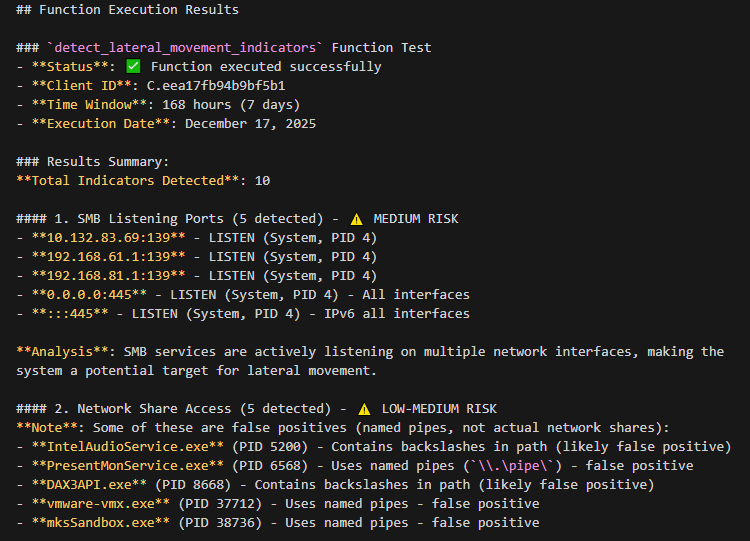
Using the Velociraptor tools, list recent network connections on HOSTNAME and flag any suspicious processes.
Sample AI Prompts That Make Velociraptor More Effective
Below are practical queries you can use inside Cursor once the Velociraptor MCP bridge is configured. They show how AI can drive Velociraptor more efficiently than manual work alone.
1. Hunt Design and VQL Assistance
- Behavior‑based hunt
Using the Velociraptor tools, design and run a hunt for suspicious PowerShell usage (encoded commands, downloads, AMSI bypass) on all Windows endpoints in the last 24 hours. Show me the VQL you used and explain each clause.
- Living‑off‑the‑land detection
Create VQL hunts with Velociraptor to detect certutil, bitsadmin, and rundll32 abuse, run them on HOSTNAME, and summarize any suspicious executions.
- Threat‑intel to hunt
Here is a description of a new campaign [paste intel summary]. Translate this into concrete Velociraptor hunts, run them on tagged servers ‘DMZ’, and explain which ATT&CK techniques each hunt maps to.
2. Automated Triage of Hunt Results
- Process triage
Take the Velociraptor process collection results from HOSTNAME, group them by parent process, and highlight the top 10 most suspicious trees. Explain why each is suspicious and suggest next steps.
- Network anomalies
Using Velociraptor’s network connection data for HOSTNAME over the last 48 hours, identify rare outbound destinations, newly seen domains, and unusual ports. Rank them by risk and justify your ranking.
- Autoruns and persistence
From the latest Velociraptor autoruns collection across all endpoints, find startup entries that are rare in the fleet or look anomalous. Present a short list of candidates with reasoning for each.
3. Timeline Reconstruction
- Single‑host incident story
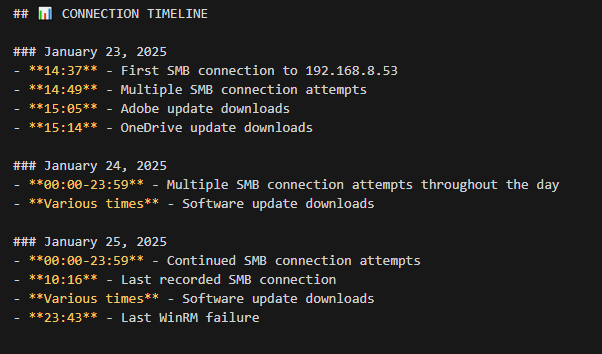
Using Velociraptor timeline data for HOSTNAME between TIME1 and TIME2, reconstruct the likely attacker sequence: initial access, privilege escalation, lateral movement, and data staging. Output a concise narrative plus a table of key events.
- Multi‑host pivoting
Given Velociraptor logs showing suspicious activity on HOST1, propose and run follow‑up collections on related hosts (same user, same IPs, similar process names) and summarize any lateral movement you find.
4. Reporting and Playbook Improvement
- Incident report drafting
Based on the Velociraptor findings from this investigation [paste key data or summaries], draft an executive summary (non‑technical) and a technical appendix (for SOC/IR) including scope, impact, root cause, and recommended remediations.
- Detection improvement
Review these Velociraptor hunt results and false positives [paste sample rows]. Suggest improved VQL filters or additional artifacts we should collect to reduce noise without missing real threats.
How This Changes DFIR and Threat Hunting
- Speed: You move faster from “idea → hunt → triage → report.”
- Accessibility: Junior analysts can describe what they want in plain language; AI translates that into Velociraptor actions.
- Consistency: AI helps reuse proven patterns for hunts, triage, and reporting, reducing analyst‑to‑analyst variance.
- Focus: Analysts spend less time on mechanical data handling and more on decisions, containment, and communication.
 Cyber Security Architect | Red/Blue Teaming | Exploit/Malware Analysis