The Quick Triage Scenario
A security alert flags suspicious activity on a Windows server. You need to assess the host quickly: running processes, network connections, persistence mechanisms, and event logs. Manual checks are slow and error-prone. You need a tool that collects and correlates data in one place.
The Host Triage Analysis Tool addresses this. It’s a Python-based Windows application that automates triage data collection, helping analysts and administrators gather and analyze system information efficiently.
What is the Host Triage Analysis Tool?
A desktop application built with PySide6 (Qt) for Windows triage. It collects system data in parallel, presents it in a tabbed interface, and supports correlation between related data points. The tool uses parallel data collection, real-time progress indicators, automatic data correlation, and a dark “Flight Deck” theme for extended use.
Core Analysis Modules
1. Process Analysis
The Process Analysis module collects running process details, including process name, PID, parent PID, CPU and memory usage, command-line arguments, process creation time, and correlation with network connections.
During an incident, identifying malicious processes is critical. This module helps analysts quickly spot processes with suspicious command-line arguments, unusual resource usage, or unexpected parent-child relationships that may indicate process injection or hollowing. For example, when investigating a ransomware incident, analysts can immediately identify processes with high CPU usage or processes spawned from unexpected parent processes, allowing them to isolate and terminate malicious activity before it spreads. The correlation with network connections enables analysts to trace data exfiltration attempts back to specific processes, providing a complete picture of the attack chain.

2. Network Connections
The Network Connections module monitors active TCP/UDP connections, capturing local and remote addresses and ports, connection state, associated process, protocol information, and correlation with firewall rules.
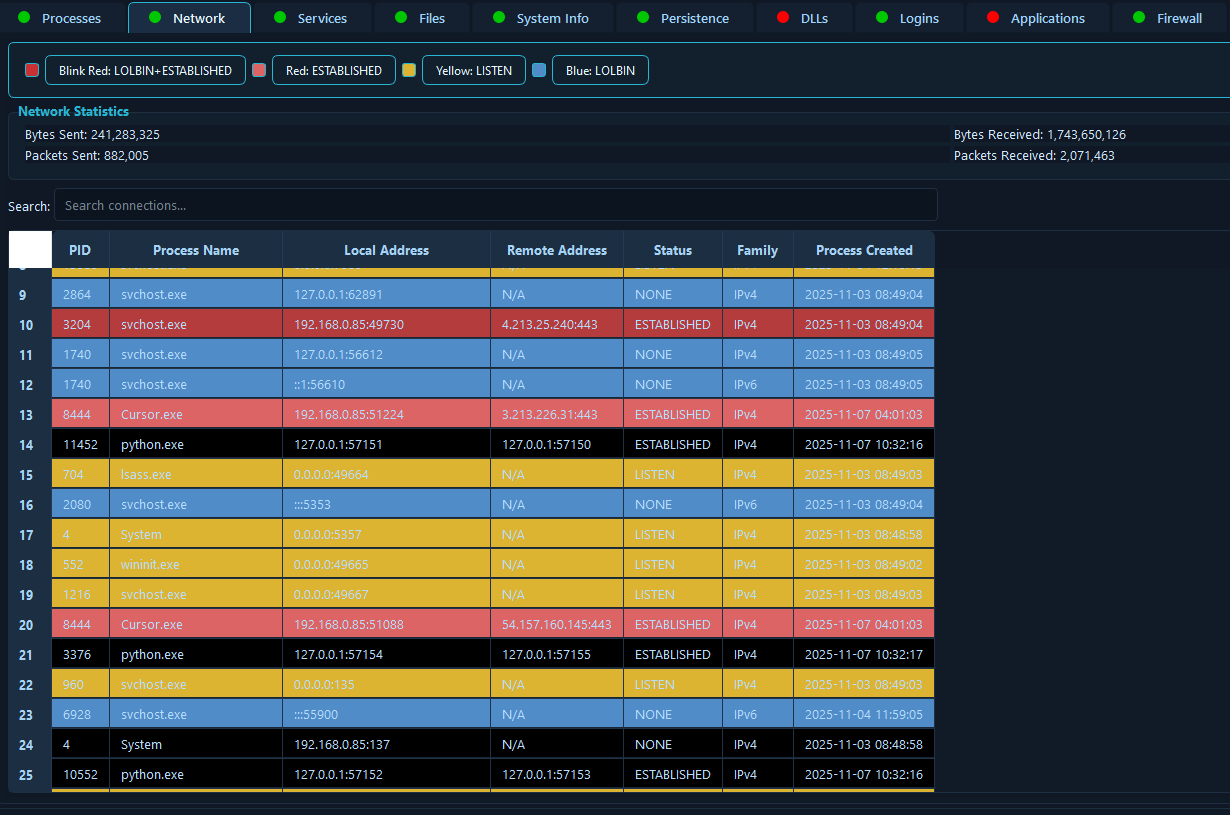
Network analysis is essential for understanding attacker communication channels and data exfiltration attempts. This module enables incident responders to quickly identify unauthorized outbound connections to suspicious IP addresses or command-and-control servers. In a scenario where an organization suspects a data breach, analysts can immediately see all active network connections, identify which processes are communicating externally, and correlate these connections with firewall rules to determine if malicious traffic is being allowed through misconfigured rules. This rapid network visibility allows responders to block malicious connections, isolate affected systems, and prevent further data loss while maintaining business-critical legitimate connections.
3. Windows Services
The Windows Services module enumerates services through the Service Control Manager, providing service name and display name, status (running or stopped), start type (automatic, manual, or disabled), binary path, and description information.

Malicious services are a common persistence mechanism used by attackers to maintain access to compromised systems. This module helps incident responders quickly identify services with suspicious binary paths, unexpected start types, or services running from non-standard locations. During an incident response scenario involving a compromised server, analysts can immediately review all services to identify those that were recently created or modified, services running from temporary directories, or services with names that mimic legitimate Windows services. This capability is crucial for root cause analysis, as stopping malicious services can prevent attackers from regaining access after initial remediation, and understanding service configurations helps responders build a timeline of the attack.
4. File System Analysis
The File System Analysis module scans critical Windows directories, including user and system startup folders, temporary directories, and system directories, while capturing file metadata such as size, timestamps, and attributes.
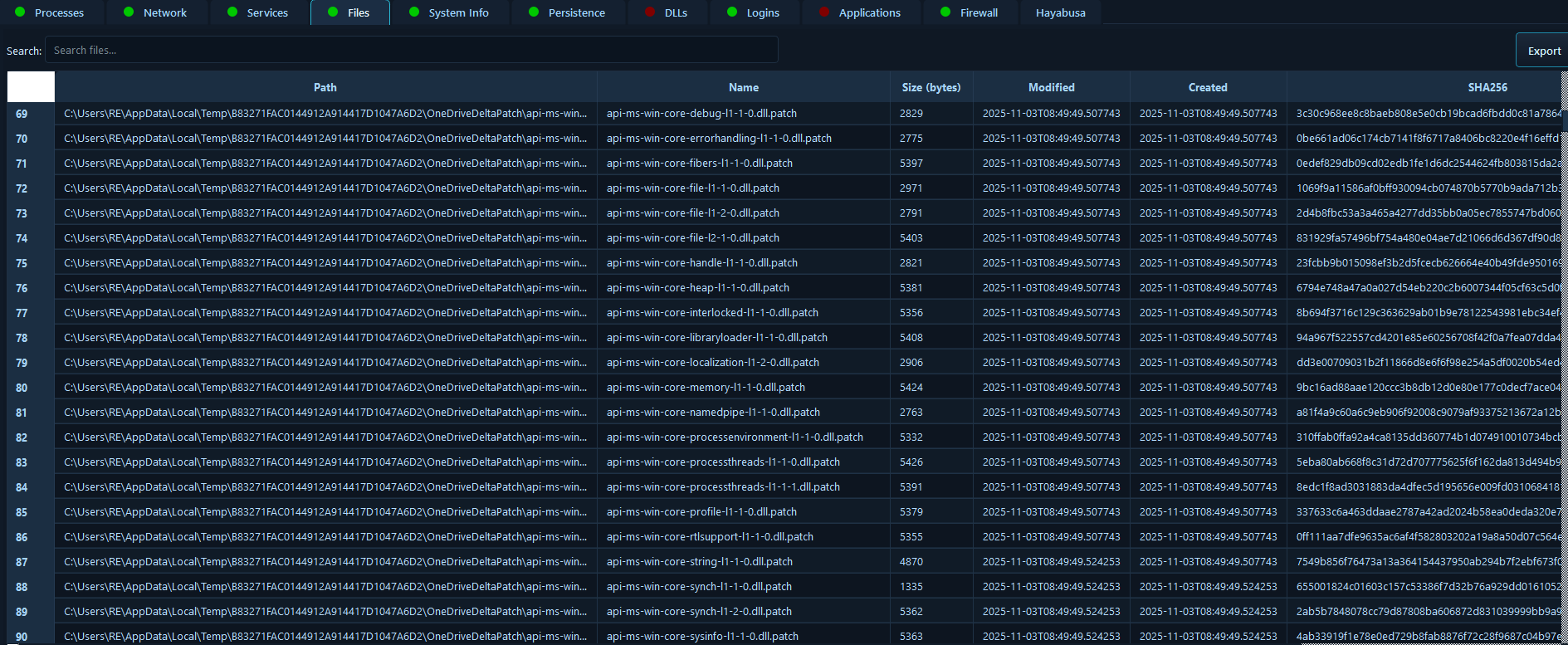
File system analysis is fundamental to incident response, as attackers often drop malicious files in specific locations to maintain persistence or execute payloads. This module enables responders to quickly identify suspicious files in startup folders, temporary directories, and system paths that may have been created or modified during an attack. In a scenario involving a phishing attack that resulted in malware execution, analysts can immediately review startup folders to find malicious executables that would execute on system boot, check temp directories for dropped payloads, and analyze file timestamps to correlate file creation times with other attack indicators. This rapid file system visibility helps responders understand the attack vector, identify all malicious artifacts, and ensure complete cleanup during remediation.
5. System Information
The System Information module provides hardware and software details, including CPU information and architecture, memory statistics, disk information, operating system version and build, network interfaces, and boot time and uptime information.
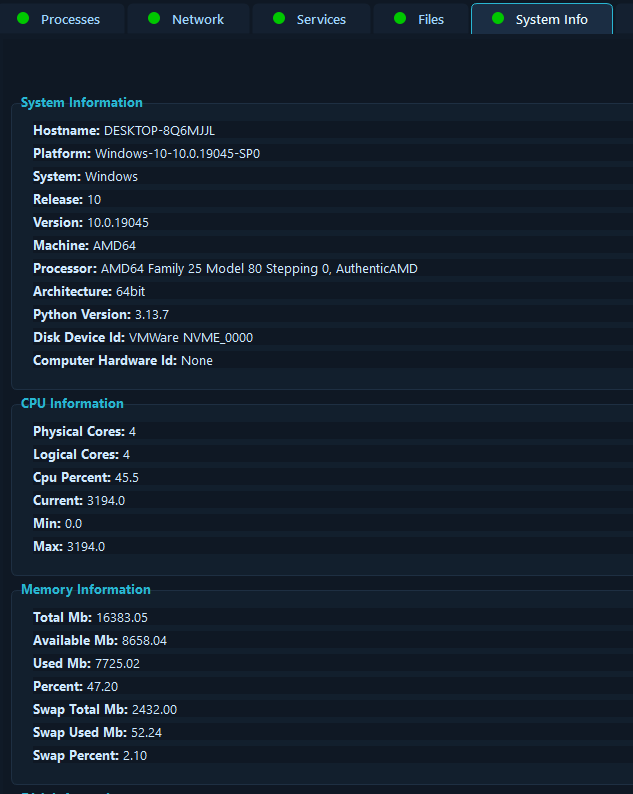
Understanding the system baseline is crucial for incident response, as it helps analysts identify anomalies and provides context for all other findings. This module provides comprehensive system information that enables responders to quickly assess the target system’s configuration, identify potential vulnerabilities based on OS version, and understand system resource constraints that may affect response actions. During an incident involving a compromised workstation, analysts can immediately determine the system’s uptime to identify if a recent reboot occurred (potentially clearing memory-based evidence), review network interfaces to identify all potential communication channels, and assess disk space to determine if log rotation or data deletion may have occurred. This system context is essential for building a complete incident timeline and ensuring all evidence is properly collected.
Security & Threat Detection Features
6. Persistence Mechanisms Detection
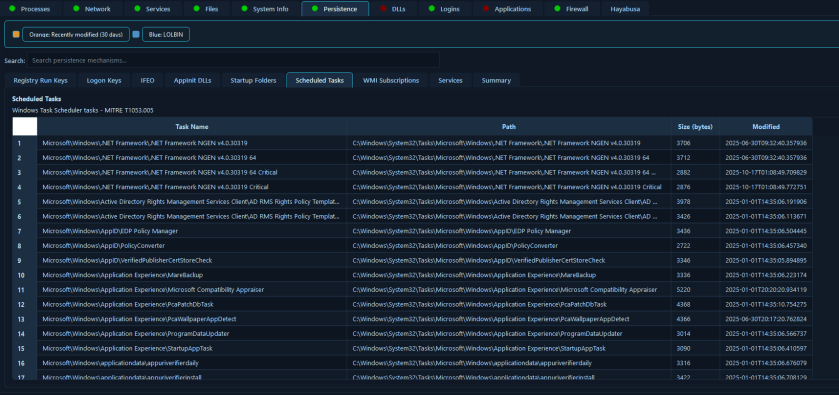
The Persistence Mechanisms Detection module enumerates Windows persistence techniques, including registry Run keys, registry logon keys, registry policies, Image File Execution Options (IFEO) hijacks, AppInit DLLs, COM object hijacks, startup folders, scheduled tasks, Windows services, and WMI event subscriptions.

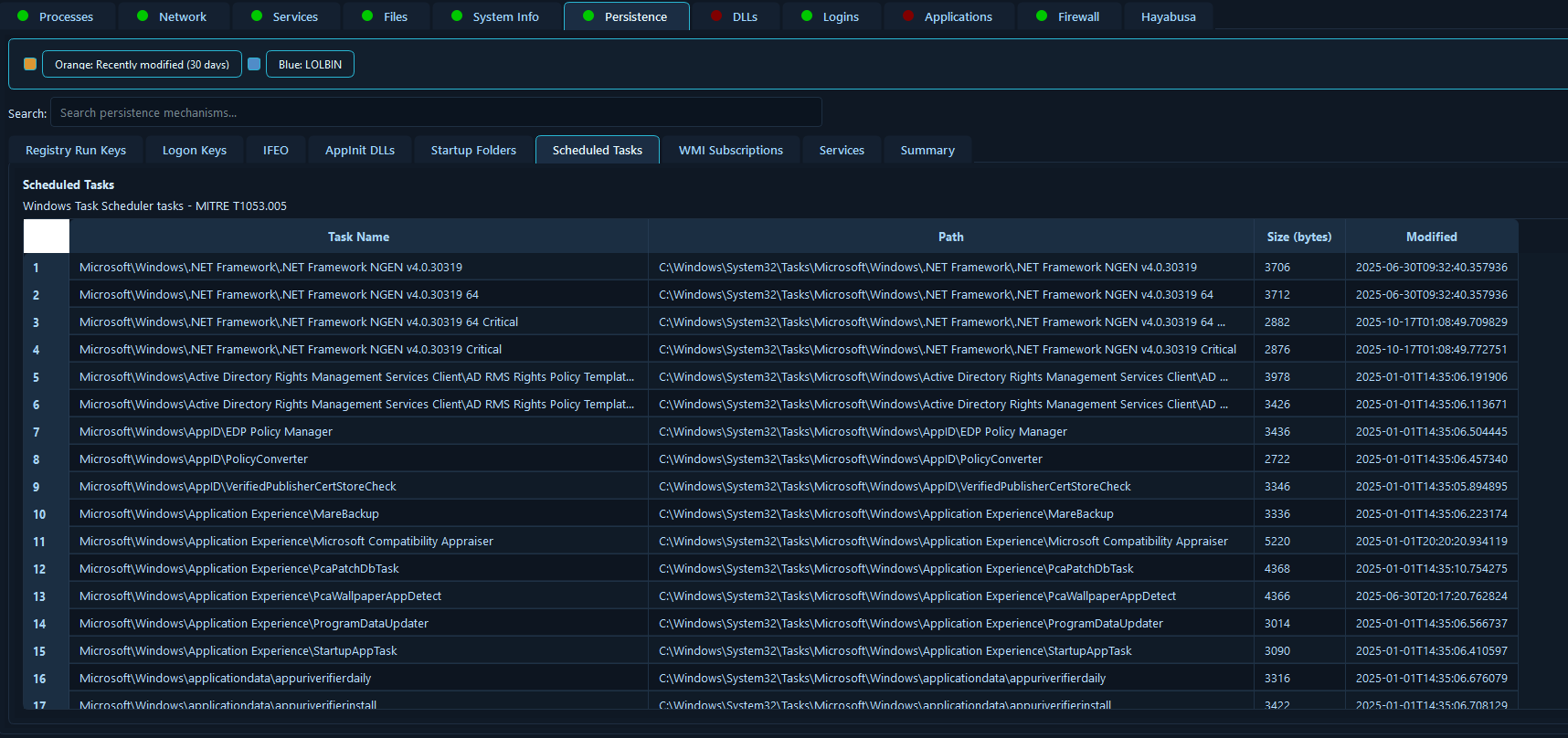
Persistence mechanisms are the foundation of long-term attacker access, and identifying all persistence vectors is critical for complete remediation. This module provides comprehensive detection of Windows persistence techniques, enabling incident responders to identify every method an attacker may have used to maintain access to a compromised system. In a scenario involving an advanced persistent threat (APT) that has been active for months, analysts can systematically review all persistence mechanisms to find registry modifications, scheduled tasks created by attackers, WMI event subscriptions that execute malicious code, and COM object hijacks that redirect legitimate processes to malicious payloads. This thorough persistence analysis is essential for preventing re-infection, as missing even one persistence mechanism means the attacker can regain access after initial cleanup, potentially leading to a prolonged incident or repeated breaches.
7. DLL Analysis
The DLL Analysis module collects loaded DLL information from all running processes, including DLL path and process association, digital signature verification, identification of unsigned or suspicious DLLs, and detection of DLLs loaded from uncommon locations, with incremental real-time updates during collection.

DLL hijacking and injection are sophisticated attack techniques that can evade traditional detection methods, making DLL analysis critical for identifying advanced threats. This module enables incident responders to identify processes loading unsigned DLLs, DLLs from suspicious locations (like temporary directories), or DLLs with unexpected names that may indicate side-loading attacks. During an incident involving a sophisticated malware that uses DLL injection to hide its presence, analysts can review all loaded DLLs to identify unsigned libraries, detect DLLs loaded from non-standard paths (indicating potential hijacking), and correlate DLL loading patterns with suspicious processes. This capability is particularly valuable for detecting fileless malware and living-off-the-land techniques, where attackers use legitimate processes to load malicious DLLs, as the signature verification and path analysis can reveal these subtle attack methods that might otherwise go unnoticed.
8. Login Events Analysis
The Login Events Analysis module collects Windows Security Event Log authentication events, including successful logons, failed logon attempts, explicit credential logons, special privilege assignments, logoff events, and user account enumeration.


Authentication events provide crucial evidence for understanding attacker access methods, lateral movement, and privilege escalation activities. This module enables incident responders to quickly identify brute-force attacks, unauthorized account access, privilege escalation attempts, and lateral movement patterns across the network. In a scenario involving a compromised domain account that was used for lateral movement, analysts can immediately review login events to identify all systems the attacker accessed, determine the timeline of account compromise, identify privilege escalation events, and detect explicit credential logons that may indicate pass-the-hash or credential theft attacks. This authentication analysis is essential for understanding the full scope of an incident, identifying all compromised accounts, and determining the attack timeline, which is critical for containment decisions and post-incident reporting.
9. Firewall Rules Analysis
The Firewall Rules Analysis module collects Windows Firewall rules from all profiles, including domain, private, and public profile rules, both inbound and outbound rules, rule actions (Allow or Block), port and protocol information, and correlation with active network connections.
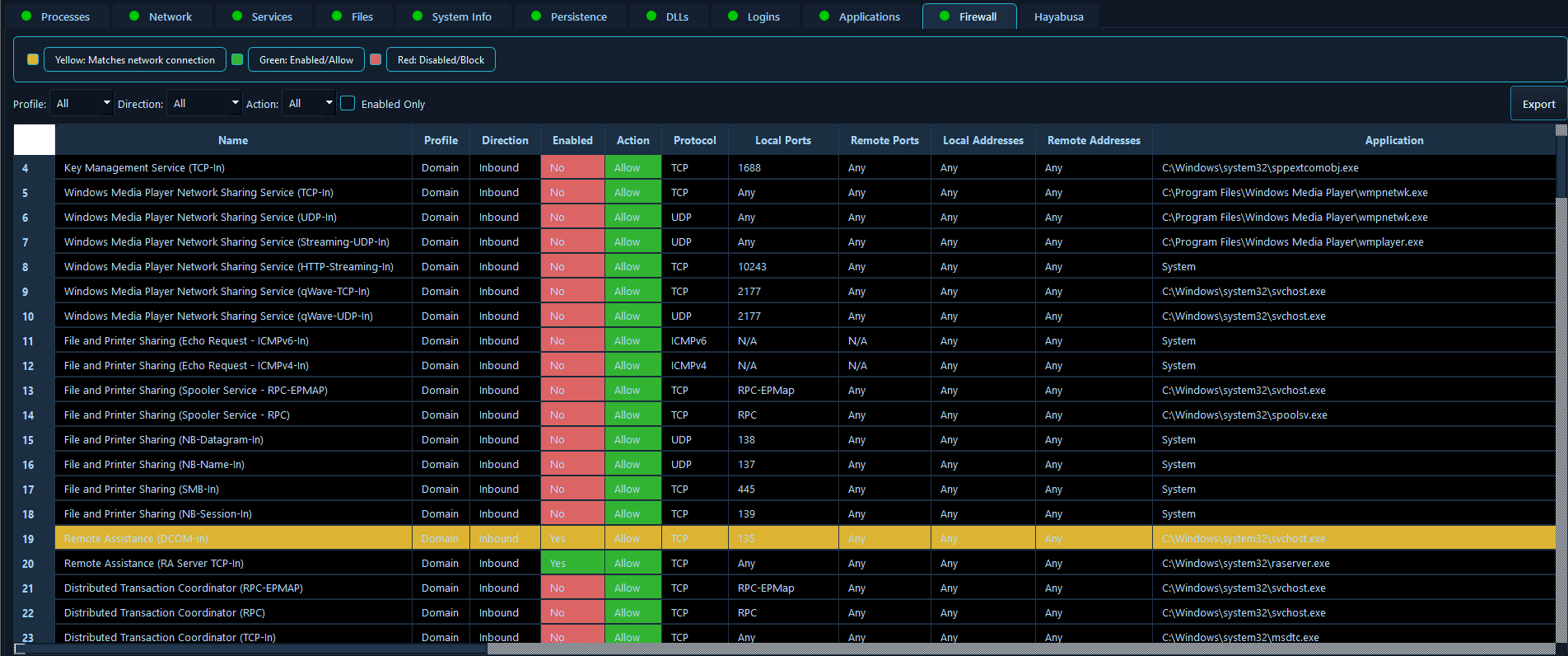
Firewall misconfigurations are a common attack vector, and understanding firewall rules is essential for both identifying how attackers gained access and preventing further unauthorized communication. This module enables incident responders to quickly identify firewall rules that may have been modified by attackers, detect unauthorized exceptions that allow malicious traffic, and correlate active network connections with firewall rules to understand if suspicious connections are being permitted. During an incident involving a compromised server that’s communicating with external command-and-control infrastructure, analysts can immediately review firewall rules to identify if attackers created rules to allow their malicious traffic, determine if legitimate rules were modified to include attacker IP addresses, and correlate active malicious connections with firewall rules to understand how the traffic is being permitted. This firewall analysis helps responders understand the attack vector, identify all communication channels, and ensure proper firewall configuration during remediation to prevent future incidents.
10. Binary Analysis
The Binary Analysis module analyzes binary files using PE parsing techniques, including PE file structure parsing, digital signature verification, import and export information extraction, section analysis, and comprehensive metadata extraction. For DLL files specifically, the module extracts and displays exported functions, enabling analysts to review the complete list of functions that a DLL exposes.
Binary analysis is crucial for understanding malicious payloads, identifying packers or obfuscation techniques, and verifying the legitimacy of suspicious executables. This module enables incident responders to quickly analyze suspicious binaries to determine if they’re signed by trusted publishers, identify imported functions that reveal the binary’s capabilities, detect packers or encryption that may indicate malware, and extract metadata that can be used for threat intelligence.

For DLL files, the ability to review exported functions is particularly valuable, as it allows analysts to understand what functionality a DLL provides, identify suspicious or unexpected exports, and detect DLLs that may be masquerading as legitimate libraries. In a scenario involving a suspicious executable found during triage, analysts can immediately analyze the binary to verify its digital signature (or lack thereof)

For DLL files, reviewing exported functions helps identify potentially malicious libraries that expose unexpected functionality or mimic legitimate system DLLs. This binary analysis capability helps responders quickly determine if a file is malicious, understand its functionality without executing it, and gather indicators of compromise (IOCs) that can be used to search for the same malware across other systems in the environment.
11. Applications Inventory
The Applications Inventory module collects comprehensive information about installed applications, including complete software inventory, application metadata, installation paths, and version information.

Understanding installed applications is essential for identifying vulnerable software, detecting unauthorized installations, and building a complete picture of the system’s attack surface. This module enables incident responders to quickly identify outdated applications with known vulnerabilities, detect unauthorized software installations that may have been used as attack vectors, and correlate application installations with other attack indicators. During an incident involving a software vulnerability exploit, analysts can immediately review installed applications to identify the vulnerable software version, determine if the application was recently installed (potentially indicating the attack vector), and check for unauthorized applications that may have been installed by attackers. This application inventory is also valuable for post-incident hardening, as responders can identify all software that needs patching or removal to prevent future incidents, and it helps build a baseline of legitimate software that can be used to identify anomalies in future investigations.
Advanced Features
12. Hayabusa Event Log Analysis
The Hayabusa Event Log Analysis module provides integrated Windows Event Log (EVTX) scanning using Hayabusa-style YAML detection rules. The module can load and compile Hayabusa and Yamato YAML rules, scan single EVTX files or entire directories, provide real-time match detection and reporting, filter rules by status and severity level, offer pause, resume, and stop scan controls, perform multi-threaded scanning for optimal performance, provide match statistics and rule-based grouping, and export scan results for further analysis.

Event log analysis is one of the most time-consuming aspects of incident response, but it’s also one of the most valuable sources of evidence. This module automates the detection of security-relevant events using proven detection rules, enabling incident responders to quickly identify attack patterns, privilege escalation attempts, lateral movement, and other malicious activities without manually reviewing thousands of log entries.
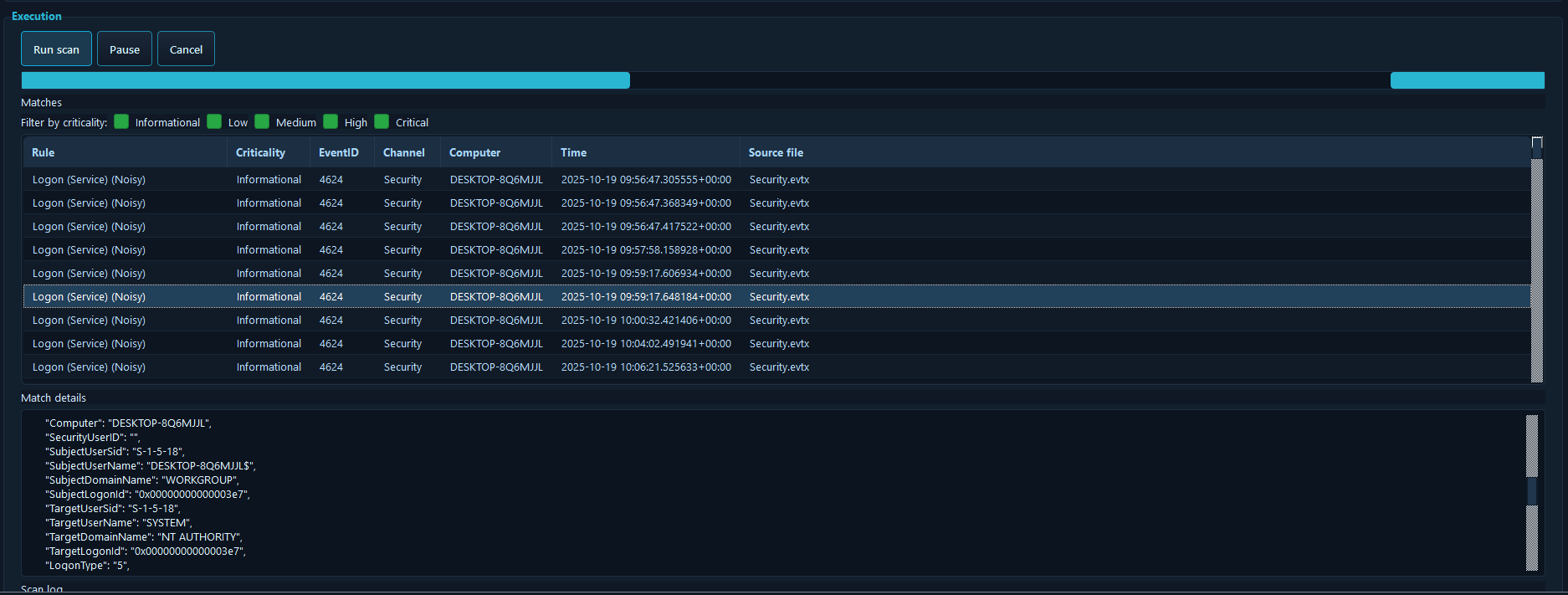
In a scenario involving a sophisticated multi-stage attack, analysts can load Hayabusa rules and scan all event logs to automatically detect indicators of various attack techniques, such as suspicious PowerShell execution, account manipulation, service creation, or scheduled task creation. The real-time match detection and rule-based grouping allow responders to quickly understand the attack timeline, identify all affected systems, and gather evidence for post-incident reporting. This automated log analysis dramatically reduces the time required for log review while ensuring comprehensive coverage of security events, enabling responders to focus on containment and remediation rather than manual log analysis.
Best Practices
To maximize the effectiveness of the Host Triage Analysis Tool, security professionals should run the application with administrator privileges to ensure full functionality, particularly for features that require access to security event logs and certain registry keys. Collecting data early in an investigation ensures that evidence is captured before potential tampering or system changes occur. Exporting data for documentation creates a permanent record of the system state at the time of analysis, which is essential for incident reporting and potential legal proceedings.
Utilizing the search and filter functionality within each tab enables analysts to quickly focus on specific items of interest, rather than manually reviewing large datasets. Correlating data across modules provides a more complete picture of security events, as relationships between processes, network connections, and other data points often reveal attack patterns that might be missed when examining data in isolation. Reviewing persistence mechanisms for unauthorized entries is critical for complete remediation, as missing persistence vectors can lead to re-infection.
Conclusion
The Host Triage Analysis Tool represents a significant advancement in Windows security triage capabilities, streamlining the investigation process through automated data collection, unified presentation, and intelligent correlation. Whether deployed for incident response, security audits, or malware analysis, the tool enables security professionals to work more efficiently and effectively.
The combination of parallel collection capabilities, real-time updates, automatic data correlation, and an intuitive interface makes this tool a practical and valuable addition to any Windows security toolkit. By reducing the time required for manual data gathering and analysis, the tool allows security professionals to focus on what matters most: understanding threats, containing incidents, and protecting organizational assets.
Note: This tool is designed exclusively for Windows systems and requires appropriate permissions based on your security policies. Always follow your organization’s security guidelines when performing system analysis.
 Cyber Security Architect | Red/Blue Teaming | Exploit/Malware Analysis