So, you’ve spotted an attacker on one of your machines. Great start! But the job’s not over. The real headache is figuring out where they’ve gone next. Attackers are sneaky; they love to pivot through a network using tools that look totally normal. This is called lateral movement, and it’s how they find the crown jewels.
For a threat hunter, trying to follow this trail in a mountain of logs can feel impossible. But what if you could trade that mountain for a simple, visual map of the attacker’s journey?
Let’s walk through how to do just that. We’ll start by grabbing data with Velociraptor and finish by creating a crystal-clear graph in Neo4j that makes spotting lateral movement almost too easy.
Kicking Off the Hunt with Velociraptor
First up, let’s talk about our main tool: Velociraptor. It’s a seriously powerful open-source tool for endpoint monitoring and forensics. Think of it as your eyes and ears on every single machine in your network. Using its flexible query language, VQL, you can pull all sorts of useful info—running processes, network connections, file hashes, you name it.
What’s great about Velociraptor is that it lets you proactively hunt for bad guys across your entire fleet at once, instead of just sitting around waiting for an alarm to go off.
Getting the Good Stuff: Enriched Network Data
To get the juicy details, we need to ask Velociraptor for more than just a basic list of connections. We want enriched data. That means for every connection, we also get the answers to questions like:
- What process kicked it off (e.g.,
psexec.exe)? - What was the full command line?
- Which user ran it (e.g.,
NT AUTHORITY\SYSTEM)? - What’s the file hash (MD5, SHA1, SHA256)?
- Is it signed by a trusted developer?
A quick VQL query can bundle all of this up into a nice JSON file for us, with entries that look like this:
{
    "Pid": 1984,
    "Ppid": 1632,
    "Name": "svchost.exe",
    "Path": "C:\\Windows\\System32\\svchost.exe",
    "CommandLine": "C:\\WINDOWS\\system32\\svchost.exe -k RPCSS -p",
    "Hash": {
        "MD5": "0cd128f416a04c06d50ec56392c25d9f",
        "SHA1": "55efb424933087d755b18468bc574db4463d9ce6",
        "SHA256": "324451797ac909a4dd40c7a2f7347ef91f6b7c786941ad5035f609c0fc15edaa"
    },
    "Username": "NT AUTHORITY\\NETWORK SERVICE",
    "Authenticode": {
        "Filename": "C:\\Windows\\System32\\svchost.exe",
        "ProgramName": "Microsoft Windows",
        "PublisherLink": null,
        "MoreInfoLink": "http://www.microsoft.com/windows",
        "SerialNumber": "330000047069f2ac064904ec1c000000000470",
        "IssuerName": "C=US, ST=Washington, L=Redmond, O=Microsoft Corporation, CN=Microsoft Windows Production PCA 2011",
        "SubjectName": "C=US, ST=Washington, L=Redmond, O=Microsoft Corporation, CN=Microsoft Windows Publisher",
        "Timestamp": null,
        "Trusted": "trusted",
        "_ExtraInfo": null
    },
    "Family": "IPv4",
    "Type": "TCP",
    "Status": "LISTEN",
    "Laddr": "0.0.0.0",
    "Lport": 135,
    "Raddr": "0.0.0.0",
    "Rport": 0,
    "Timestamp": "2025-06-03T13:17:32Z"
}
Finding the Bad Stuff in the Data
Alright, we’ve got our data. Now the real fun begins. Instead of reading every single line, we can scan for some classic red flags:
- Admin Port Activity: Connections to ports like
445(SMB),3389(RDP), or5985(WinRM) are huge clues for lateral movement. - Unsigned Files: An
unsignedapp making network connections? Super suspicious. - Living Off the Land: Attackers love using legitimate tools like
psexec.exeorpowershell.exeto do their dirty work. - Weird File Paths: Is an executable running from
C:\Windows\Temp\? That’s not normal.
In our data, we can spot a clear pattern: an unsigned psexec.exe on one host connects to another. But once the attacker hops a few more times, following along in a text file is a nightmare.
Let’s Graph It! Making Sense of the Chaos
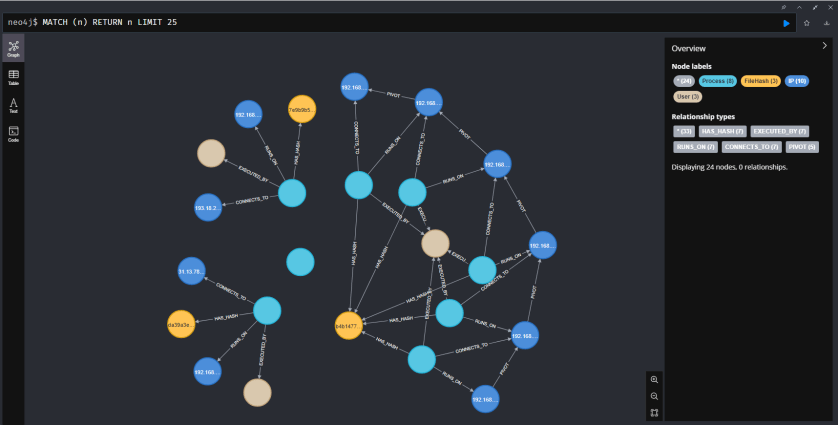
This is where a tool like a graph database becomes your best friend. Neo4j, for example, is built for connected data. It lets you stop looking at rows in a spreadsheet and start seeing a map of what’s actually happening. A connection is no longer just a log entry; it’s a line connecting two points, and a series of those lines shows you the path the attacker took.
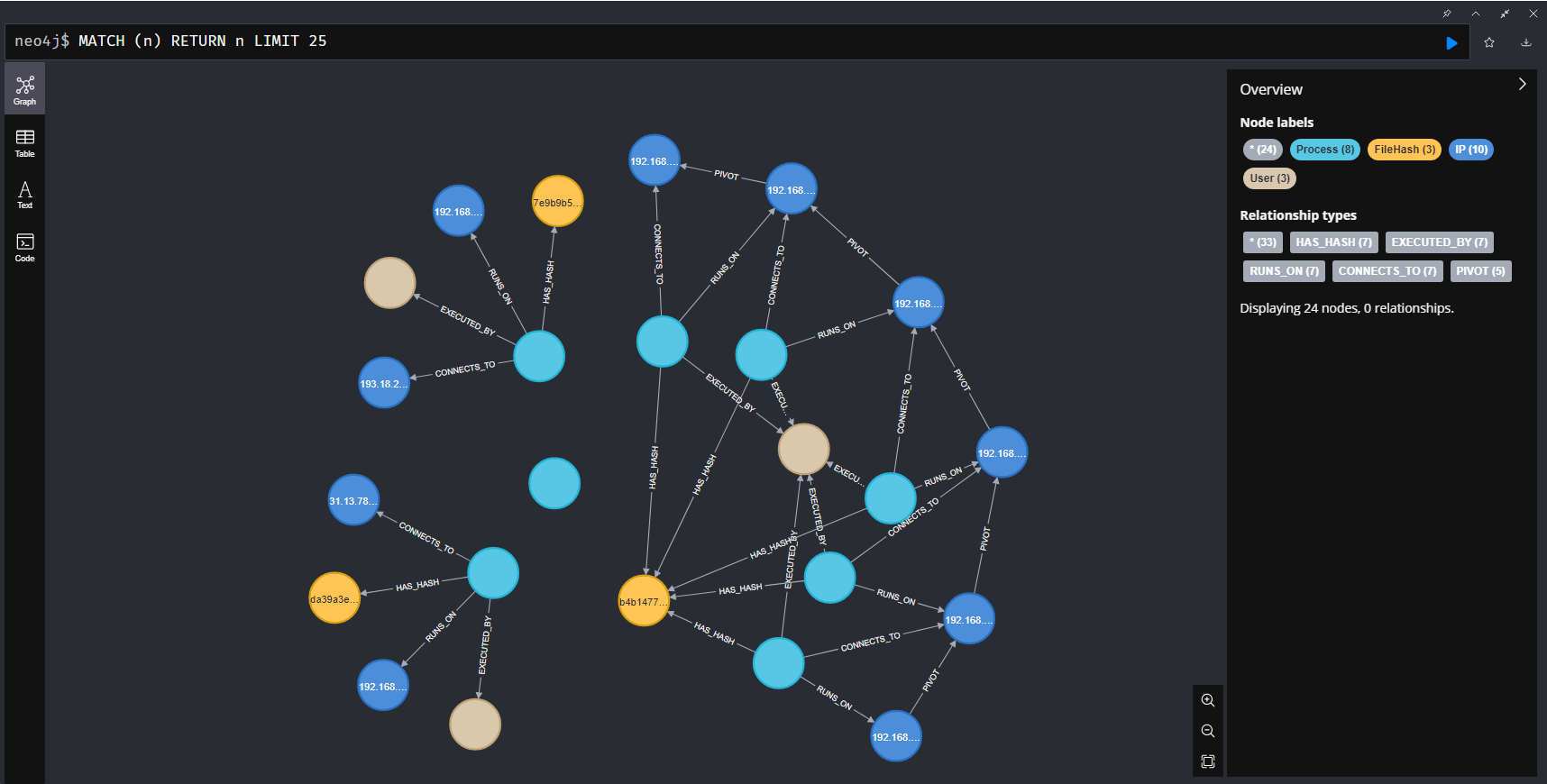
This visual approach gives us two huge advantages:
- We can see the application used for the pivot. The graph will clearly show a
Processnode (likepsexec.exe) sitting between twoIPnodes. This immediately tells us which application was used to make the jump from one host to the other. - We can check the hash to confirm the tool. Because our graph model includes a
FileHashnode connected to each process, we can instantly see if the same tool is being used everywhere. If we see five different process names (psexec.exe,update.exe,svc.exe…) all pointing to the exact same hash, we’ve caught the attacker red-handed trying to hide their tool by renaming it. This is incredibly difficult to spot in raw logs but stands out immediately in a graph.
From JSON to Graph with a Bit of Python
So, how do we get our JSON data into this cool graph format? With a simple Python script. The script reads each log entry and converts it into graph-speak:
The Nodes (The “Things”):
IPaddressesProcessnames and PIDsUseraccountsFileHashvalues
The Relationships (The “Actions”):
- A
ProcessRUNS_ONanIP. - A
ProcessisEXECUTED_BYaUser. - A
ProcessHAS_HASHaFileHash. - A
ProcessCONNECTS_TOanotherIP.
The real magic here is making FileHash its own node. Now, we can instantly see if the same tool was used to attack multiple machines, even if the attacker renamed the file to totally_not_a_virus.exe.
import json
from neo4j import GraphDatabase
import os


def load_data_from_velociraptor_json(filename="Windows.Network.NetstatEnriched.json"):
    """
    Loads data from a Velociraptor JSON stream file (one JSON object per line).

    Args:
        filename (str): The name of the file to load data from.

    Returns:
        list: A list of dictionaries loaded from the JSON file, or an empty list if an error occurs.
    """
    if not os.path.exists(filename):
        print(f"Error: The file '{filename}' was not found.")
        return []

    data = []
    try:
        with open(filename, 'r', encoding='utf-8') as f:
            for line in f:
                # Skip empty lines
                if line.strip():
                    data.append(json.loads(line))
        return data
    except json.JSONDecodeError as e:
        print(f"Error: Could not decode JSON from the file '{filename}'. Invalid line: {e.doc}")
        return []
    except Exception as e:
        print(f"An unexpected error occurred while reading the file: {e}")
        return []


class Neo4jUploader:
    """
    A class to upload Velociraptor network data to a Neo4j database.
    """

    def __init__(self, uri, user, password):
        """
        Initializes the Neo4j driver.
        """
        try:
            self.driver = GraphDatabase.driver(uri, auth=(user, password))
            self.driver.verify_connectivity()
            print("Successfully connected to Neo4j.")
        except Exception as e:
            print(f"Failed to connect to Neo4j: {e}")
            self.driver = None

    def close(self):
        """Closes the database connection."""
        if self.driver is not None:
            self.driver.close()
            print("Neo4j connection closed.")

    def delete_all_data(self):
        """Deletes all nodes and relationships from the database."""
        if self.driver is None:
            return
        print("Deleting all existing data...")
        with self.driver.session() as session:
            session.execute_write(lambda tx: tx.run("MATCH (n) DETACH DELETE n"))
        print("All data deleted.")

    def setup_constraints(self):
        """Creates unique constraints on nodes for better performance and data integrity."""
        if self.driver is None:
            return
        print("Setting up database constraints...")
        with self.driver.session() as session:
            # Drop old constraints if they exist to avoid conflicts
            try:
                session.run("DROP CONSTRAINT process_pid_unique IF EXISTS")
            except:
                pass  # Ignore errors if constraint doesn't exist

            # Create new constraints
            try:
                session.run("CREATE CONSTRAINT ip_address_unique IF NOT EXISTS FOR (i:IP) REQUIRE i.address IS UNIQUE")
            except Exception as e:
                print(f"Could not create IP constraint: {e}")
            try:
                session.run("CREATE CONSTRAINT user_name_unique IF NOT EXISTS FOR (u:User) REQUIRE u.name IS UNIQUE")
            except Exception as e:
                print(f"Could not create User constraint: {e}")
            try:
                session.run(
                    "CREATE CONSTRAINT file_hash_md5_unique IF NOT EXISTS FOR (h:FileHash) REQUIRE h.md5 IS UNIQUE")
            except Exception as e:
                print(f"Could not create FileHash constraint: {e}")

    def upload_data(self, data):
        """Uploads a list of records to Neo4j."""
        if self.driver is None:
            print("Cannot upload data, no database connection.")
            return

        print(f"Starting to upload {len(data)} records...")
        with self.driver.session() as session:
            for i, record in enumerate(data):
                if record:  # Ensure the record is not empty
                    session.execute_write(self._create_graph_objects, record)
            print(f"Finished uploading {len(data)} records.")

    def create_pivot_relationships(self):
        """Creates simplified [:PIVOT] relationships between hosts."""
        if self.driver is None:
            return
        print("Creating PIVOT relationships...")
        with self.driver.session() as session:
            session.execute_write(
                lambda tx: tx.run("""
                MATCH (src_ip:IP)<-[:RUNS_ON]-(p:Process)-[:CONNECTS_TO]->(dest_ip:IP)
                WHERE src_ip.address <> dest_ip.address AND dest_ip.address STARTS WITH '192.168.'
                MERGE (src_ip)-[r:PIVOT]->(dest_ip)
                """)
            )
        print("PIVOT relationships created.")

    @staticmethod
    def _create_graph_objects(tx, record):
        """Defines the Cypher queries to create graph objects from a single record."""

        # Use .get() with default values to handle missing fields gracefully
        pid = record.get("Pid")
        if not pid:
            return  # Skip records without a PID

        # MERGE the Process node. Uniquely identified by PID and the timestamp of the log.
        # This handles cases where PIDs are reused over time.
        tx.run(
            """
            MERGE (p:Process {pid: $pid, name: $name, cmdline: $cmdline, timestamp: $timestamp})
            ON CREATE SET
                p.path = $path,
                p.username = $username
            """,
            pid=pid,
            name=record.get("Name"),
            cmdline=record.get("CommandLine"),
            path=record.get("Path"),
            username=record.get("Username"),
            timestamp=record.get("Timestamp")
        )

        # Link Process to its FileHash
        if record.get("Hash") and record.get("Hash").get("MD5"):
            tx.run("""
                MATCH (p:Process {pid: $pid, timestamp: $timestamp})
                MERGE (h:FileHash {md5: $md5})
                ON CREATE SET
                    h.sha1 = $sha1,
                    h.sha256 = $sha256
                MERGE (p)-[:HAS_HASH]->(h)
            """,
                   pid=pid,
                   timestamp=record.get("Timestamp"),
                   md5=record.get("Hash").get("MD5"),
                   sha1=record.get("Hash").get("SHA1"),
                   sha256=record.get("Hash").get("SHA256")
                   )

        # Link Process to the User
        if record.get("Username"):
            tx.run("""
                MATCH (p:Process {pid: $pid, timestamp: $timestamp})
                MERGE (u:User {name: $username})
                MERGE (p)-[:EXECUTED_BY]->(u)
            """,
                   pid=pid,
                   timestamp=record.get("Timestamp"),
                   username=record.get("Username")
                   )

        # Handle network connections
        if record.get("Status") in ["ESTABLISHED", "ESTAB"] and record.get("Laddr") and record.get("Raddr"):
            # This handles the main connection logic for established traffic
            tx.run("""
                MATCH (p:Process {pid: $pid, timestamp: $timestamp})
                MERGE (src_ip:IP {address: $laddr})
                MERGE (dest_ip:IP {address: $raddr})

                MERGE (p)-[:RUNS_ON]->(src_ip)
                MERGE (p)-[c:CONNECTS_TO]->(dest_ip)
                ON CREATE SET
                    c.port = $rport,
                    c.status = $status
                """,
                   pid=pid,
                   timestamp=record.get("Timestamp"),
                   laddr=record.get("Laddr"),
                   raddr=record.get("Raddr"),
                   rport=record.get("Rport"),
                   status=record.get("Status")
                   )
        elif record.get("Status") == "LISTEN" and record.get("Laddr"):
            # This handles listening ports
            tx.run("""
                MATCH (p:Process {pid: $pid, timestamp: $timestamp})
                MERGE (listen_ip:IP {address: $laddr})
                MERGE (p)-[:RUNS_ON]->(listen_ip)
                SET p.listening_port = $lport
                """,
                   pid=pid,
                   timestamp=record.get("Timestamp"),
                   laddr=record.get("Laddr"),
                   lport=record.get("Lport")
                   )


if __name__ == "__main__":
    # --- Configuration ---
    NEO4J_URI = "bolt://localhost:7687"
    NEO4J_USER = "neo4j"
    NEO4J_PASSWORD = "password"
    JSON_FILE = "simulated.json"

    # --- Main Execution ---
    network_data = load_data_from_velociraptor_json(JSON_FILE)

    if network_data:
        uploader = Neo4jUploader(NEO4J_URI, NEO4J_USER, NEO4J_PASSWORD)
        if uploader.driver:
            uploader.delete_all_data()
            uploader.setup_constraints()
            uploader.upload_data(network_data)
            uploader.create_pivot_relationships()
            uploader.close()
The 10,000-Foot View: Creating a PIVOT Path
The detailed graph with all the processes and hashes is awesome for digging in, but sometimes you just want the big picture. This is where the PIVOT relationship comes in. It’s a summary relationship that answers one simple question: “Which hosts did the attacker jump between, and in what order?”
We create this with a Cypher query that finds the complex (IP)<-[:RUNS_ON]-(Process)-[:CONNECTS_TO]->(IP) pattern and creates a simple (IP)-[:PIVOT]->(IP) shortcut.
Based on the sample data created, the query identifies the following chain of events:
- A process on
192.168.1.101connects to192.168.1.102. - A process on
192.168.1.102connects to192.168.1.103. - A process on
192.168.1.103connects to192.168.1.104. - …and so on.
// Find the full path of lateral movement, including the file hash
MATCH path = (src_ip:IP)<-[:RUNS_ON]-(p:Process)-[:HAS_HASH]->(h:FileHash),
             (p)-[:CONNECTS_TO]->(dest_ip:IP)

// Return the full path for visualization
RETURN path
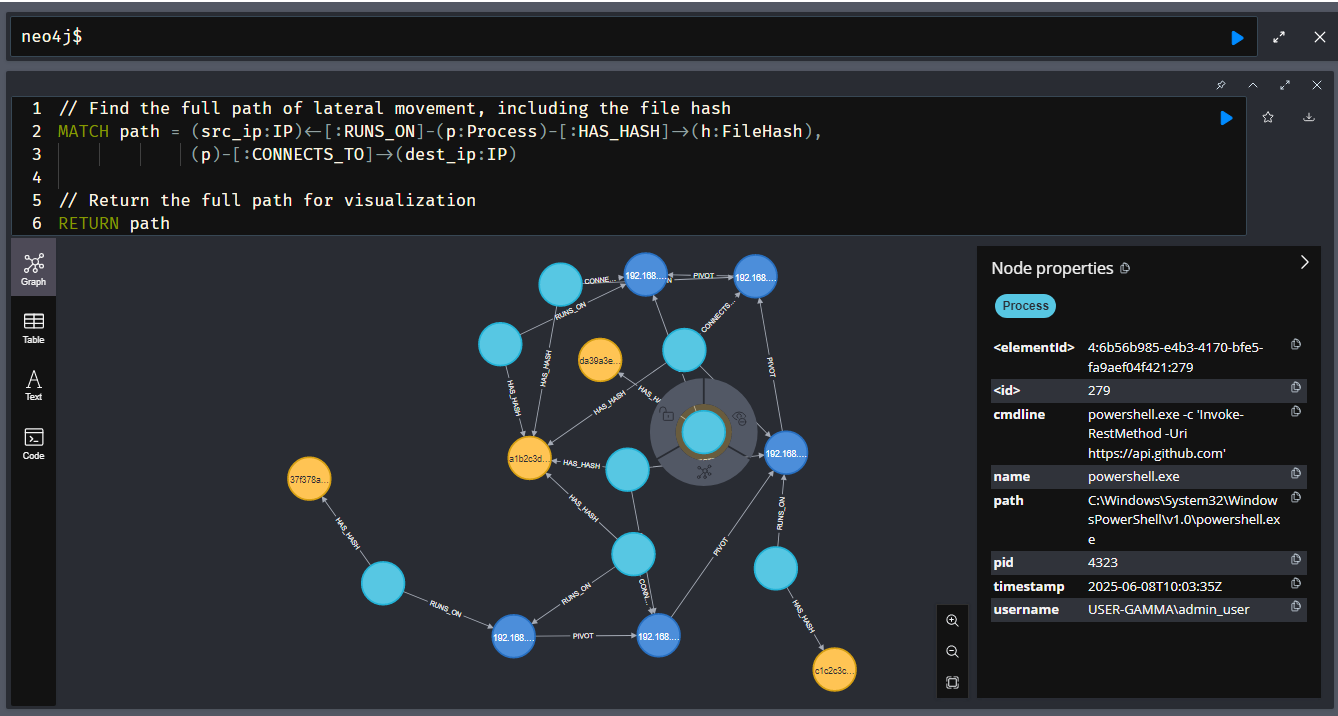
After running the query to create the [:PIVOT] relationships, we can visualize the entire attack with this simple command:
MATCH path = (src:IP)-[:PIVOT*]->(dest:IP)
RETURN path
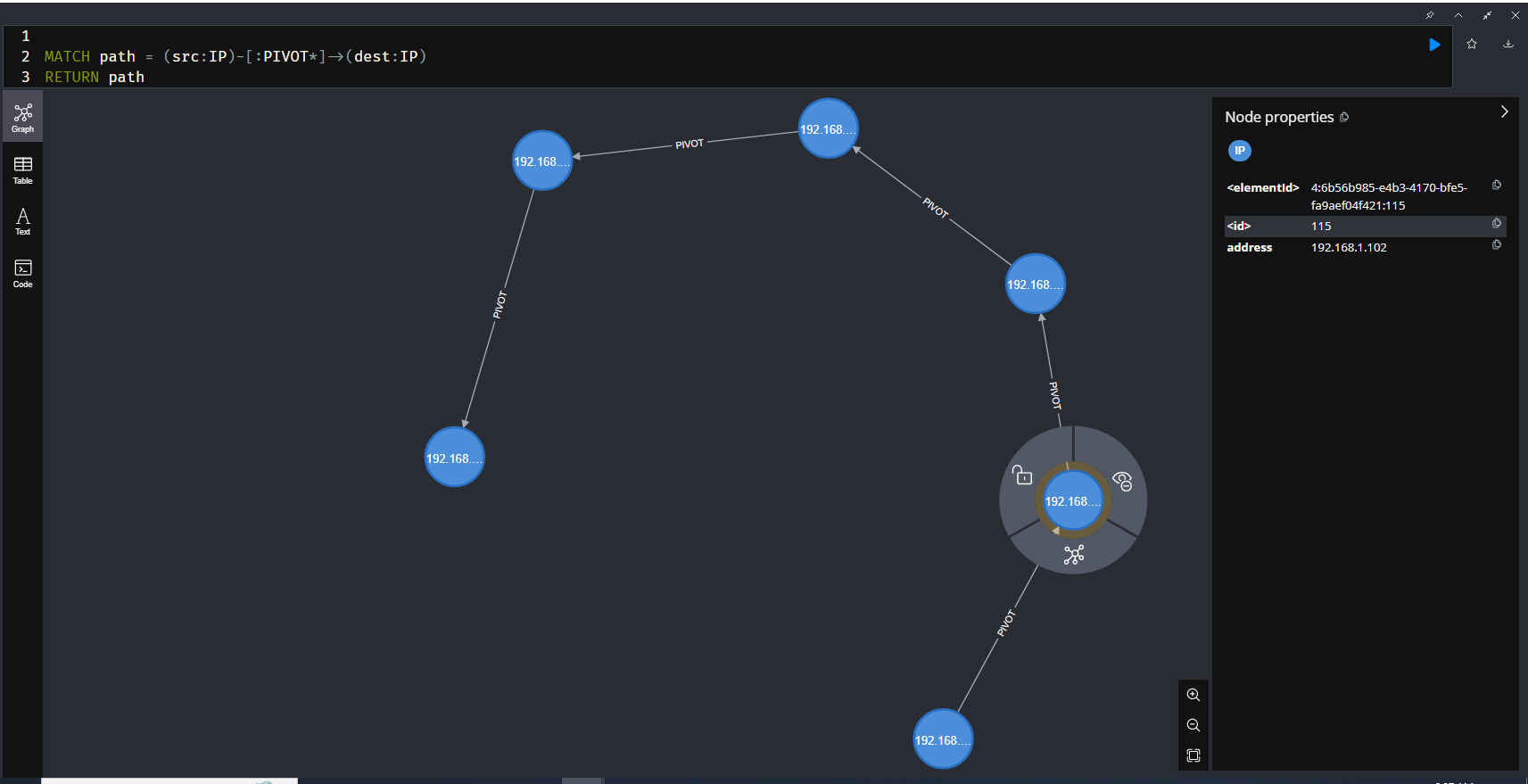
The result is no longer a messy web of processes and files. Instead, you get a clean, undeniable map of the attacker’s hops across the network, which looks like this:
(192.168.1.101) –> (192.168.1.102) –> (192.168.1.103) –> (192.168.1.104) –> (192.168.1.105) –> (192.168.1.106)
This clear, high-level view is perfect for reports and explaining the scope of an incident to management. You can instantly see the start and end of the attack chain and identify every machine that was compromised along the way.
Conclusion
Hunting for threats on a big network can feel like a huge chore, but it doesn’t have to be. By pairing Velociraptor’s incredible data collection with Neo4j’s knack for visualizing connections, you can turn a flood of logs into a story that’s easy to read. This workflow helps you find that needle in the haystack and see the entire thread it’s attached to, letting you respond faster and more effectively.
Sample Data Dumped from Velociraptor
{"Pid":8001,"Ppid":1632,"Name":"sys_update.exe","Path":"C:\\Windows\\Temp\\sys_update.exe","CommandLine":"C:\\Windows\\Temp\\sys_update.exe --remote-exec 192.168.1.102","Hash":{"MD5":"1a2b3c4d5e6f7g8h9i0j1k2l3m4n5o6p","SHA1":"a1b2c3d4e5f6a7b8c9d0e1f2a3b4c5d6e7f8a9b0","SHA256":"0a1b2c3d4e5f6a7b8c9d0e1f2a3b4c5d6e7f8a9b0c1d2e3f4a5b6c7d8e9f0a1b"},"Username":"NT AUTHORITY\\SYSTEM","Authenticode":{},"Family":"IPv4","Type":"TCP","Status":"ESTABLISHED","Laddr":"192.168.1.101","Lport":51011,"Raddr":"192.168.1.102","Rport":445,"Timestamp":"2025-06-08T10:01:00Z"}
{"Pid":8002,"Ppid":1204,"Name":"network_svc.exe","Path":"C:\\Windows\\System32\\network_svc.exe","CommandLine":"network_svc.exe -p 192.168.1.103","Hash":{"MD5":"1a2b3c4d5e6f7g8h9i0j1k2l3m4n5o6p","SHA1":"a1b2c3d4e5f6a7b8c9d0e1f2a3b4c5d6e7f8a9b0","SHA256":"0a1b2c3d4e5f6a7b8c9d0e1f2a3b4c5d6e7f8a9b0c1d2e3f4a5b6c7d8e9f0a1b"},"Username":"NT AUTHORITY\\SYSTEM","Authenticode":{},"Family":"IPv4","Type":"TCP","Status":"ESTABLISHED","Laddr":"192.168.1.102","Lport":52022,"Raddr":"192.168.1.103","Rport":445,"Timestamp":"2025-06-08T10:02:00Z"}
{"Pid":8003,"Ppid":888,"Name":"driver_util.exe","Path":"C:\\ProgramData\\driver_util.exe","CommandLine":"driver_util.exe /target:192.168.1.104","Hash":{"MD5":"1a2b3c4d5e6f7g8h9i0j1k2l3m4n5o6p","SHA1":"a1b2c3d4e5f6a7b8c9d0e1f2a3b4c5d6e7f8a9b0","SHA256":"0a1b2c3d4e5f6a7b8c9d0e1f2a3b4c5d6e7f8a9b0c1d2e3f4a5b6c7d8e9f0a1b"},"Username":"NT AUTHORITY\\SYSTEM","Authenticode":{},"Family":"IPv4","Type":"TCP","Status":"ESTABLISHED","Laddr":"192.168.1.103","Lport":53033,"Raddr":"192.168.1.104","Rport":445,"Timestamp":"2025-06-08T10:03:00Z"}
{"Pid":8004,"Ppid":4012,"Name":"taskmgr.exe","Path":"C:\\Users\\Public\\taskmgr.exe","CommandLine":"taskmgr.exe -s 192.168.1.105","Hash":{"MD5":"1a2b3c4d5e6f7g8h9i0j1k2l3m4n5o6p","SHA1":"a1b2c3d4e5f6a7b8c9d0e1f2a3b4c5d6e7f8a9b0","SHA256":"0a1b2c3d4e5f6a7b8c9d0e1f2a3b4c5d6e7f8a9b0c1d2e3f4a5b6c7d8e9f0a1b"},"Username":"NT AUTHORITY\\SYSTEM","Authenticode":{},"Family":"IPv4","Type":"TCP","Status":"ESTABLISHED","Laddr":"192.168.1.104","Lport":54044,"Raddr":"192.168.1.105","Rport":445,"Timestamp":"2025-06-08T10:04:00Z"}
{"Pid":8005,"Ppid":2112,"Name":"audit_log.exe","Path":"C:\\Temp\\audit_log.exe","CommandLine":"audit_log.exe 192.168.1.106","Hash":{"MD5":"1a2b3c4d5e6f7g8h9i0j1k2l3m4n5o6p","SHA1":"a1b2c3d4e5f6a7b8c9d0e1f2a3b4c5d6e7f8a9b0","SHA256":"0a1b2c3d4e5f6a7b8c9d0e1f2a3b4c5d6e7f8a9b0c1d2e3f4a5b6c7d8e9f0a1b"},"Username":"NT AUTHORITY\\SYSTEM","Authenticode":{},"Family":"IPv4","Type":"TCP","Status":"ESTABLISHED","Laddr":"192.168.1.105","Lport":55055,"Raddr":"192.168.1.106","Rport":445,"Timestamp":"2025-06-08T10:05:00Z"}
{"Pid":4321,"Ppid":1111,"Name":"chrome.exe","Path":"C:\\Program Files\\Google\\Chrome\\Application\\chrome.exe","CommandLine":"chrome.exe","Hash":{"MD5":"d41d8cd98f00b204e9800998ecf8427e","SHA1":"37f378a9c2d1b7d5f306917f8a7e4e1a0676a0a0","SHA256":"e3b0c44298fc1c149afbf4c8996fb92427ae41e4649b934ca495991b7852b855"},"Username":"USER-ALPHA\\user.name","Authenticode":{"Trusted":"trusted"},"Family":"IPv4","Type":"TCP","Status":"ESTABLISHED","Laddr":"192.168.1.101","Lport":58001,"Raddr":"8.8.8.8","Rport":443,"Timestamp":"2025-06-08T10:01:15Z"}
{"Pid":4322,"Ppid":1112,"Name":"teams.exe","Path":"C:\\Users\\jane.doe\\AppData\\Local\\Microsoft\\Teams\\current\\teams.exe","CommandLine":"teams.exe","Hash":{"MD5":"b1b2b3b4b5b6b7b8b9b0b1b2b3b4b5b6","SHA1":"c1c2c3c4c5c6c7c8c9c0c1c2c3c4c5c6c7c8c9c0","SHA256":"d1d2d3d4d5d6d7d8d9d0d1d2d3d4d5d6d7d8d9d0d1d2d3d4d5d6d7d8d9d0d1d2"},"Username":"USER-BETA\\jane.doe","Authenticode":{"Trusted":"trusted"},"Family":"IPv4","Type":"TCP","Status":"ESTABLISHED","Laddr":"192.168.1.103","Lport":58002,"Raddr":"52.112.132.0","Rport":443,"Timestamp":"2025-06-08T10:02:25Z"}
{"Pid":4323,"Ppid":1113,"Name":"powershell.exe","Path":"C:\\Windows\\System32\\WindowsPowerShell\\v1.0\\powershell.exe","CommandLine":"powershell.exe -c 'Invoke-RestMethod -Uri https://api.github.com'","Hash":{"MD5":"e3b0c44298fc1c149afbf4c8996fb924","SHA1":"da39a3ee5e6b4b0d3255bfef95601890afd80709","SHA256":"9f86d081884c7d659a2feaa0c55ad015a3bf4f1b2b0b822cd15d6c15b0f00a08"},"Username":"USER-GAMMA\\admin_user","Authenticode":{"Trusted":"trusted"},"Family":"IPv4","Type":"TCP","Status":"ESTABLISHED","Laddr":"192.168.1.105","Lport":58003,"Raddr":"140.82.121.3","Rport":443,"Timestamp":"2025-06-08T10:03:35Z"}
 Cyber Security Architect | Red/Blue Teaming | Exploit/Malware Analysis